
Totalview 2026 SP3 Release Notes
We are proud to announce Totalview 2026 SP3 and share the highlights for this release.
-
See full list of changes to Totalview in the Change Log.
Contacts in Smart Clients
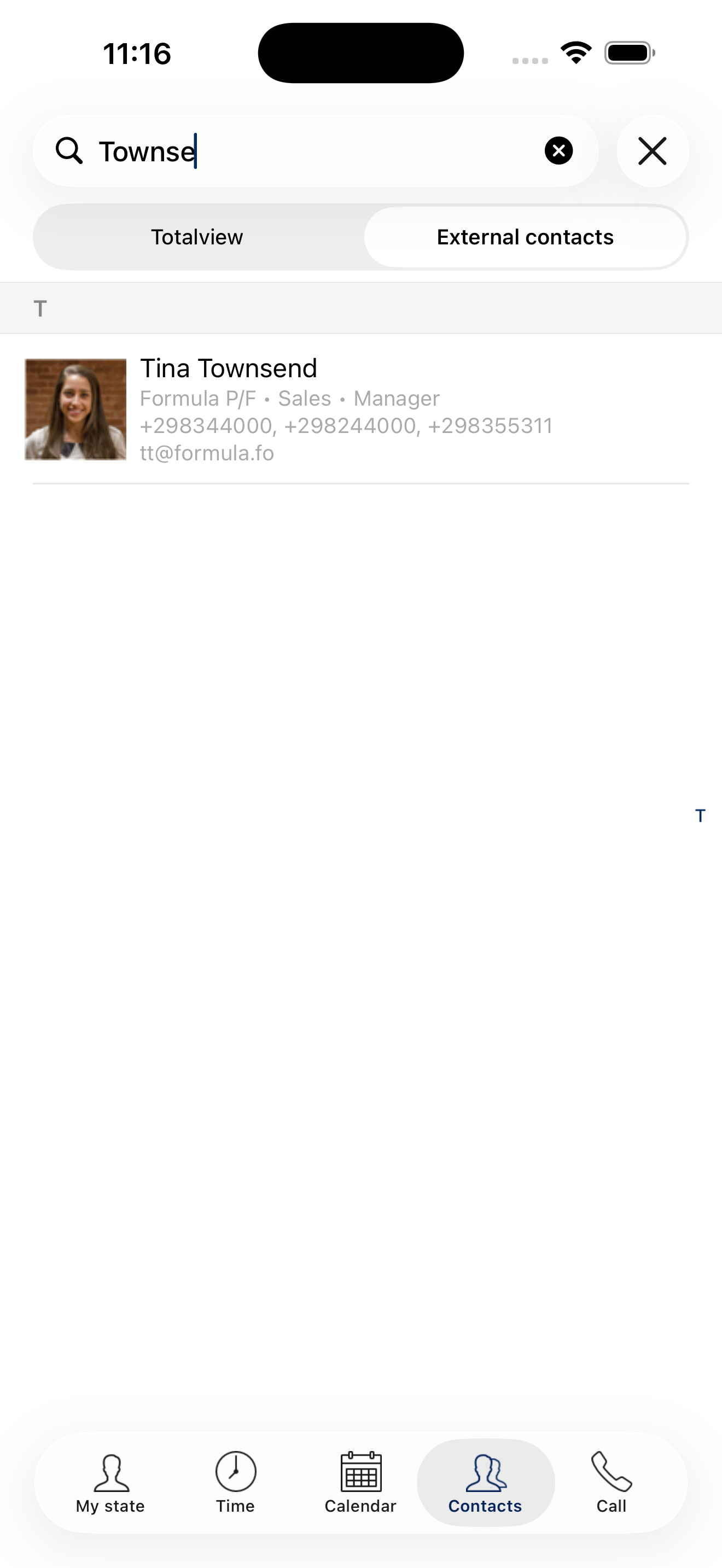
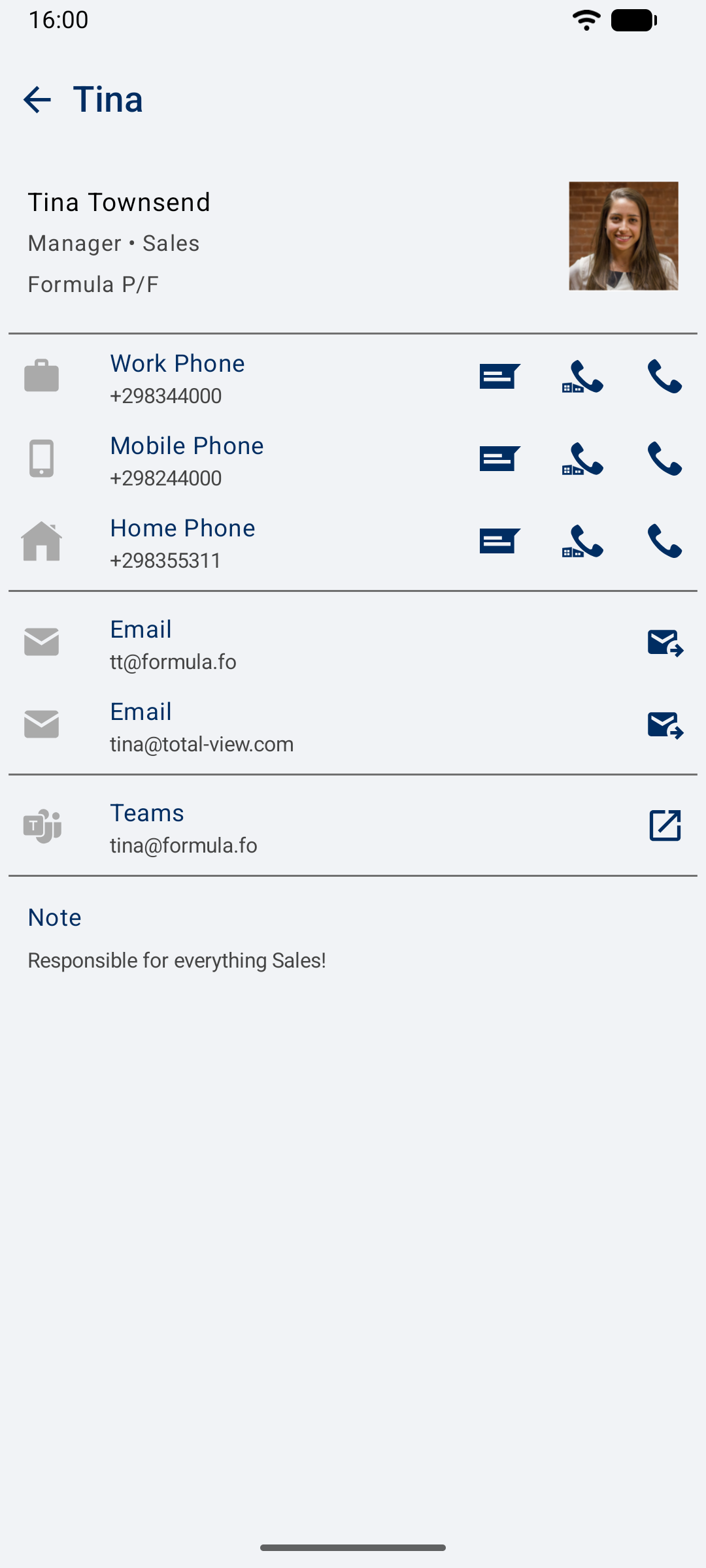
The Contacts experience is now available in the Totalview Smart Clients for iPhone and Android. Employees can find the people they need while working from a mobile device, without switching to another application or relying on a separate phonebook.
Whether a user is looking up a colleague, checking an external contact before returning a call, or confirming how to reach a customer, contact information is available where it is needed. The updated search also makes it easier to find the right person when only part of their information is known.
Key Highlights
Mobile Contact Search: Search for Totalview contacts directly from the iPhone and Android Smart Clients.
Broader Search Results: Find contacts by company name, job title, department, email address, and contact ID, in addition to contact names and phone numbers.
Contact Details on the Go: View the available contact information without leaving the Smart Client.
Find the Right Contact Faster
Contact search now considers more than a name or phone number. Users can search across contact details including company name, job title, department, and email address, helping them find a contact from the information they have at hand.
The contact details view brings the available information together in one place, including the contact’s associated phone numbers and other details. This makes the Smart Client a more useful companion for employees who need to look up and act on contact information while away from their desktop.
A New Templates Page in WebAdmin
Templates are now managed in WebAdmin. The new Templates page brings an important part of everyday Totalview administration into the web interface, giving administrators a modern place to maintain the settings that guide users when they change state or create reservations.
Templates can combine a suggested state, descriptive text, location, expected end time, and phone settings such as forwarding, Do Not Disturb, and outbound caller ID. By centralizing their management in WebAdmin, administrators can maintain these common workflows from the same interface they use for users, contacts, states, and other configuration.
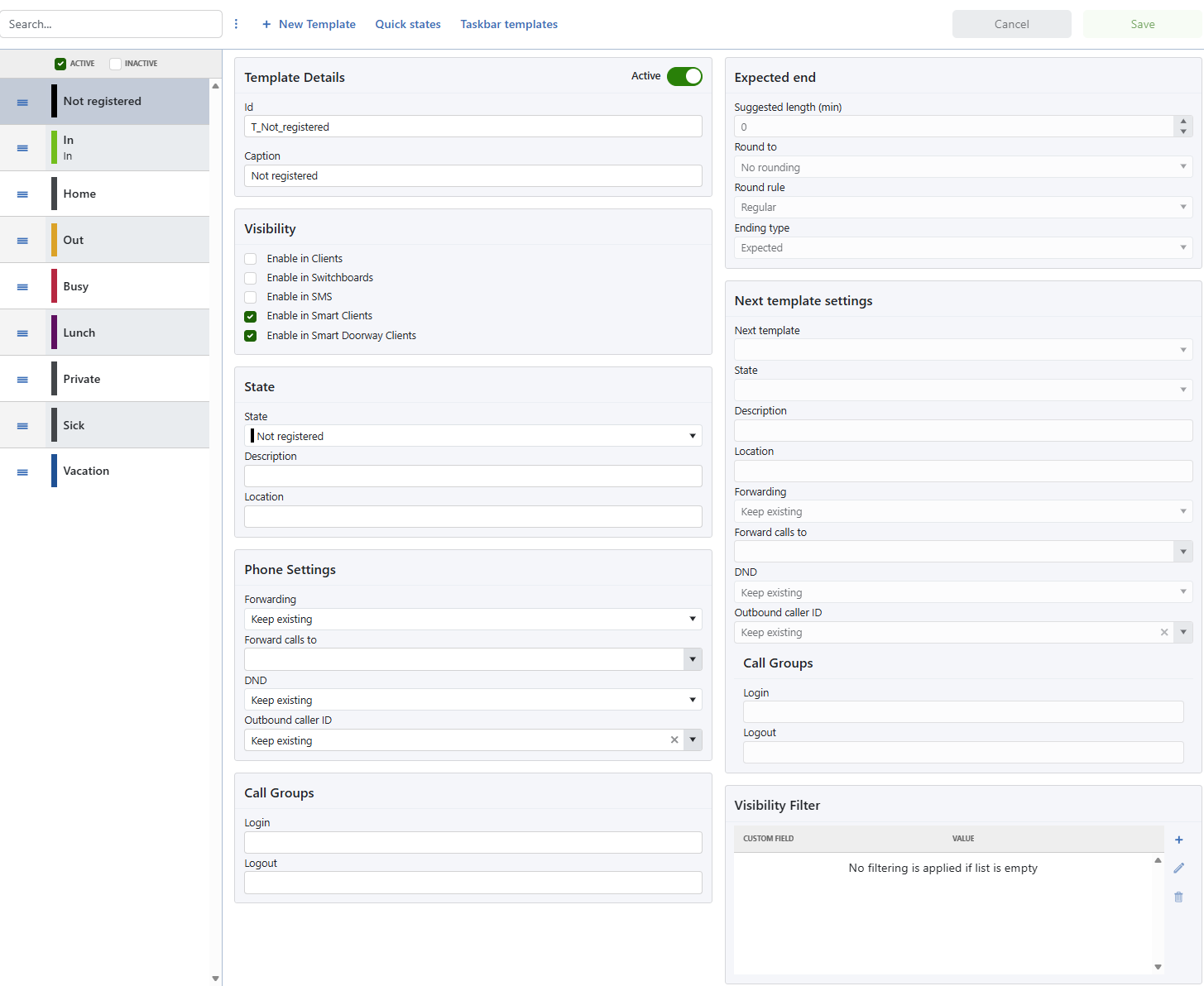
For full configuration details, see the Templates documentation.
MSI Installer for Totalview Clients
Totalview Cloud customers can now deploy the Totalview Desktop Client using a standard Windows Installer package. The new TotalviewClientInstaller.msi makes
it easier for IT administrators to include Totalview in managed software deployment processes and deliver a consistent client setup across the organization.
The MSI installer complements the existing user-installed setup executable. It is designed for organizations that want to control installation through their established endpoint-management tools instead of asking each employee to run a setup program manually.
Key Highlights
Standard Windows Installer Package: Deploy the Desktop Client with
TotalviewClientInstaller.msi.Unattended Installation: Use
msiexecoptions such as/quietfor silent deployments.Deployment Tool Integration: Use the package with Intune, Configuration Manager, Group Policy, and other MSI-capable deployment tools.
Tenant Configuration: Provide the required tenant DNS name and port as installer properties.
Optional Components: Select Totalview Time, Totalview HR, and Totalview Admin during the initial installation.
Configurable Shortcuts: Choose which Totalview application shortcuts are created for each user group.
Ready for Managed Deployment
The MSI package works with standard msiexec command-line options, making it suitable for unattended deployment. It can be integrated with tools such as
Microsoft Intune, Microsoft Configuration Manager, and Group Policy, or used by other software distribution systems that support Windows Installer packages.
Tenant connection details are supplied as installer properties, allowing the deployed client to be configured for the correct Totalview Cloud tenant from the first launch. Administrators can also use standard MSI logging options to collect installation diagnostics when troubleshooting a rollout.
Choose the Components Your Users Need
The installer supports optional components and shortcut settings, so a deployment can be tailored to the needs of a user group. Administrators can include Totalview Time, Totalview HR, and Totalview Admin where required, and choose whether shortcuts are created for Totalview Client, Contact Center, Receptionist, and Switchboard.
The package is installed per user and does not require administrative privileges to run. Totalview is installed in the current user’s local application data folder.
Important
The MSI installer is only available for Totalview Cloud deployments.
For command examples and all available properties, see Installing the Totalview Desktop Client with the MSI Installer.
Other Exciting News
Caller History and Desktop Client
Call comments can now be added while assigning Call Codes, for users with the Call Comment right.
Caller History has improved focus and text-selection behavior when working with comments.
The Active Queue and number log now show a contact’s name and company, making it easier to recognize callers at a glance.
Contact-related forms have improved tab navigation, and copying information from contact details now provides button feedback.
The contact type is shown in the number-list dropdown when working with contacts.
WebAdmin
The Users view supports exact-match searches by surrounding the search term with quotation marks.
Keyboard navigation and shortcuts are now available on the Users, States, Templates, and Contacts pages.
License information on the dashboard now shows active and inactive user counts, and the active-user label has been updated to Licensed Users.
The WebAdmin log window can now be expanded for easier review of detailed log output.
Administrators can edit the XML settings for TotalviewAttachment connectors installed on the tenant server.
Connector lists are now separated into active and inactive connectors.
Smart Clients and Mobile Apps
External contacts now show additional information in the iPhone and Android call log, with direct navigation to contact details.
Private contacts are clearly identified with a private indicator in the contact details view.
Users of the iPhone and Android apps are now logged out only when their account is deactivated or deleted, or when they no longer have permission to use the app.
The minimum supported iOS version for iPhone and Doorway iPad is now iOS 15, in line with current Apple App Store requirements.
Web Client
The Time account balance overview loads faster.
Keyboard navigation in the side menu has been enhanced.
Client origin icons have been updated.
Platform and Administration
OneConnect now handles BackInService and OutOfService events and indicates when a device is connected to the PBX.
Connectors now use timeouts to prevent a lost TCP connection from causing a connector to hang.
New tenants created in Totalview Cloud Manager are non-deletable by default.
Mobile support logging has been improved