
Totalview 2026 SP2 Release Notes
We are proud to announce Totalview 2026 SP2 and share the highlights for this release.
-
See full list of changes to Totalview in the Change Log.
A Richer, More Powerful Contacts Experience
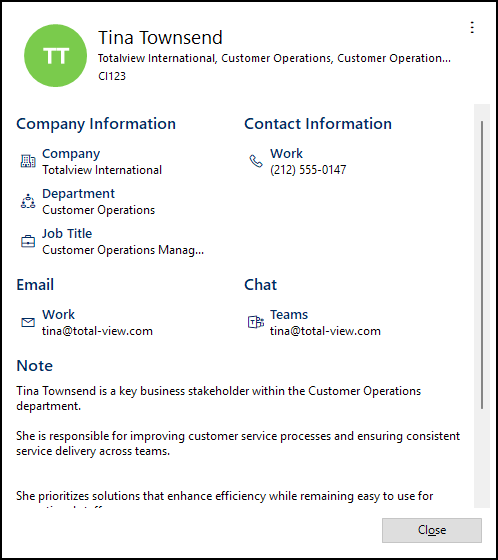
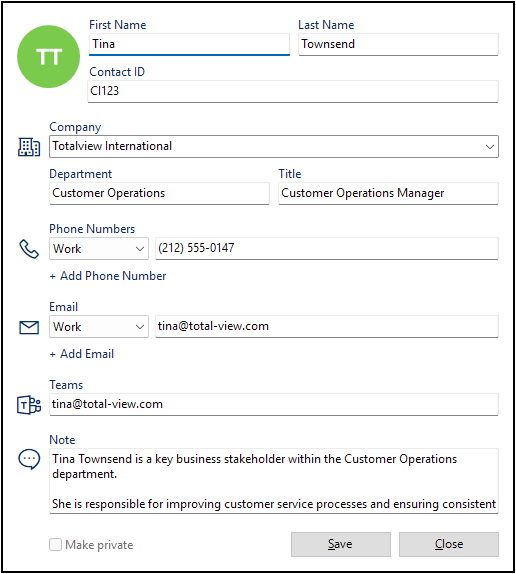
Building on the Contacts foundation introduced in 2026 SP1, this release delivers a significantly richer experience for managing and working with contact information across Totalview. Whether you are a receptionist looking up a caller, an administrator importing contacts from an external source, or a user managing your own private contact list — Contacts in 2026 SP2 is faster, more flexible, and more deeply integrated than ever before.
Highlights
Dedicated Contact Views in the Desktop Client: The desktop client now features proper detail and edit views for contacts. Users can view full contact information and make edits directly within the client, without switching to a separate admin tool.
Search That Works the Way You Expect: Contact search now covers all phone numbers associated with a contact — not just the primary work and mobile numbers. Finding the right person is faster, regardless of which number they can be reached on.
Private Contacts Under Your Control: Users can now manage their own private contacts independently, even without rights to modify shared public contacts. Personal contact lists stay personal.
Broader Import Support: Contact import in Web Admin now supports vCard format. All other supported formats have also been updated to handle the full range of contact fields available in the new Contacts model.
Cleaner Web Admin: The legacy phonebook page has been retired. All contact management is now consolidated in the Contacts section, keeping the interface focused and consistent.
Konnekta: Real-Time Queue Visibility
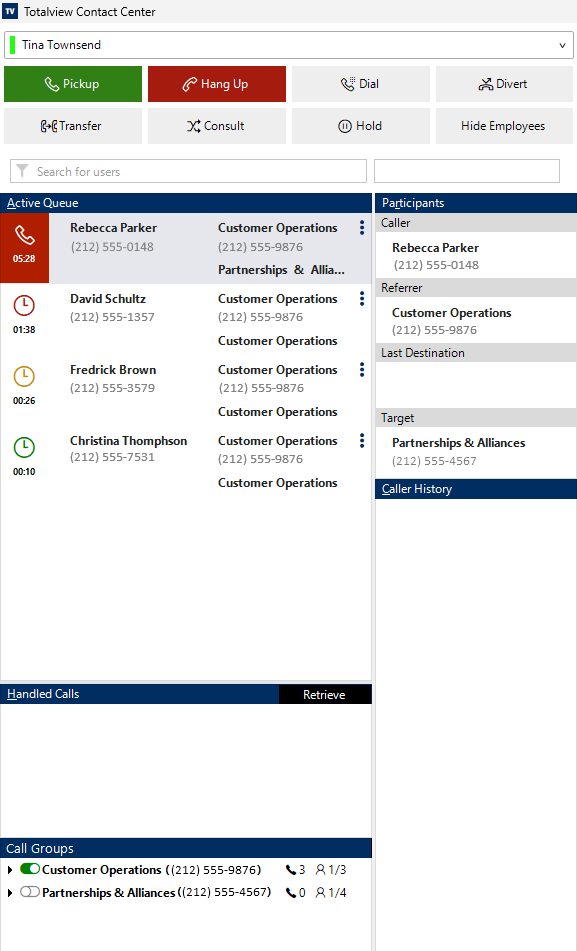
Agents and supervisors in Konnekta-connected contact centers can now see how many calls are waiting in queue — directly in the Totalview client, in real time. No separate wallboard, no switching between tools. Queue depth is visible where your team is already working, making it easier to spot pressure building up and act before it becomes a problem.
Smarter Layouts That Adapt to Your Screen
The Totalview desktop client now keeps columns aligned to fill the full available width as you resize the window. Whether you are working on a compact laptop screen or a wide external monitor, your contact and call group lists now use the space available to them — no more unused whitespace on wider screens, and no more columns that stop short of the edge. The client simply looks right, whatever the window size.
Native Look and Feel on iPhone and iPad
Both the Totalview iPhone app and the Doorway iPad client have been updated to fully support Liquid Glass, the new visual design language at the heart of iOS 26. Users upgrading to the latest Apple devices will find that Totalview integrates seamlessly into the new operating system aesthetic — familiar, polished, and native-feeling from the first launch.
Emergency Broadcast Now on Android
When something urgent happens, every second counts. The Emergency Broadcast feature — which lets authorized users instantly send an SMS to all internal Totalview contacts — is now available on Android, in addition to iPhone. Wherever your on-call administrator happens to be, they can reach the entire organization with a single action.
Note
Emergency Broadcast is only available to customers hosted on Totalview Cloud.
Key Features
Permission-Controlled: The feature is not enabled by default. Administrators grant access to specific users via Smart Client Permissions in Web Admin.
160-Character Limit: Messages are capped at 160 characters to ensure clarity and reliable delivery.
Other Exciting News
Entra ID
Administrators can now configure a group filter to limit which users are synchronized from Entra to Totalview. This is useful for large tenants where only a subset of Entra users should be managed in Totalview.
Reports
GPS locations are now visible in Totalview installations that do not have the Time module enabled.
Server and Infrastructure
The same user logging in from the same client type on the same machine is no longer counted as a new license seat, preventing inadvertent license consumption on reconnects.
Web Admin
Live logging in Web Admin now uses a polling-based approach to handle cases where Windows does not emit file change events, ensuring logs are always up to date.
Admin
Deactivated templates are no longer shown as selectable options when configuring Providers.
Aligned phonebook import functionality to the new Contact handling.