
Totalview 2025 Release Notes
We are proud to announce that Totalview 2025 is here and share the highlights for this release.
Exciting News! Entra ID User Synchronization is Now Supported!
Added balance sums and balance movements in Timesheet for mobile App
-
See full list of changes to Totalview in the Change Log.
1. Exciting News! Entra ID User Synchronization is Now Supported!

We are thrilled to announce that our latest release includes the integration of Entra ID user synchronization! This enhancement offers several key benefits:
Automated Updates: Streamline user management with automatic synchronization, significantly reducing manual efforts.
Enhanced Security: Ensure that user data remains consistently up-to-date and secure.
Seamless Integration: Experience a more cohesive and efficient system with Entra ID.
This update represents an advancement in providing a more secure, efficient, and user-friendly experience.
2. Introducing Konnekta PBX User Synchronization!
We are also excited to announce the integration of Konnekta PBX user synchronization in this release. For our Konnekta clients, this means:
Automated Updates: Streamline the management of telephony devices and user identities with automatic synchronization, reducing manual efforts.
Enhanced Security: Ensure that user data within the PBX system remains consistently up-to-date and secure.
Seamless Integration: Experience a more cohesive and efficient PBX system with Konnekta.
3. State synchronization for Konnekta
We are excited to introduce the State Synchronization on Startup/Reconnect functionality in our latest release. This Ensure that all telephony devices and user states are accurately synchronized upon startup or reconnection, minimizing disruptions.
Optimized Performance:
Experience a smoother and more efficient PBX system with Konnekta.
This update represents a significant improvement in providing a more reliable, efficient, and user-friendly telephony experience.
4. Call Wrap-Up Feature for Konnekta
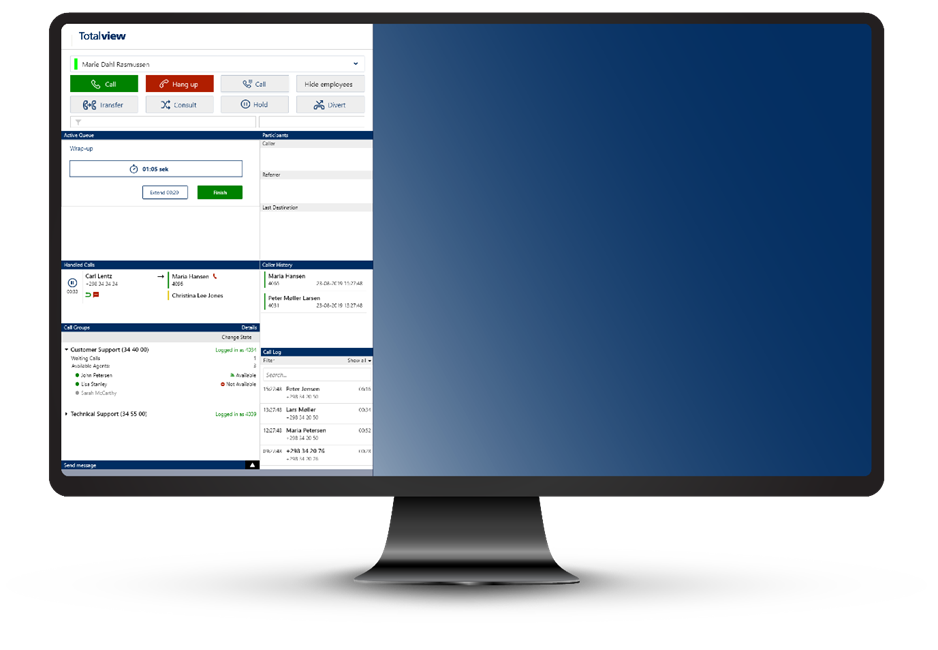
With the Call Wrap-up feature you can allow your agents to efficiently complete post-call tasks, ensuring all necessary information is recorded.
This feature allows agents to handle calls more effectively, move on to the next customer promptly, and reduce errors by providing dedicated time to finalize call details and notes.
Key benefits include:
Thorough documentation of all customer interactions, leading to improved service quality.
Enhanced efficiency, accuracy, and customer focus in your call center operations.
5. Added balance sums and balance movements in Timesheet for mobile App

In addition to viewing your states, you can now also see your balance sums and balance movements for each day as part of your Timesheet on both iOS and Android.
The balance sums and balance movements are combined with you daily states, where you can toggle between the two views.
This update aims to provide you with better insights and contributing to a more efficient and user-friendly experience.
6. Customize the Totalview app menu tabs in WebAdmin

We are pleased to announce a new feature in our WebAdmin module that allows managers to control which tabs are available in the Totalview app menu.
This gives you the ability to customize the options available to your employees simplifying the usage of the tools they need.
Key Features:
Customizable Menu Tabs: Managers can now select and control which tabs are displayed in the Totalview app, tailoring the menu to meet specific needs.
Improved Accessibility: By providing only the necessary options, employees can navigate the app more efficiently.
Enhanced Control: Managers have greater control over the app’s interface, ensuring that employees have access to the most relevant features.
7. Connection Recovery for the HR Client
This improvement automatically re-establishes the connection to the HR server in the event of network disruptions, ensuring a seamless and uninterrupted user experience.
Key Benefits:
Automatic Reconnection: The HR Client will now automatically attempt to reconnect to the HR server if a network disruption occurs, minimizing downtime and improving productivity.
Enhanced Stability: Users will experience fewer interruptions and a more stable connection, allowing them to focus on their tasks without worrying about connectivity issues.
8. Other Exciting News
Support for Totalview Command in cloud
Added option to click on location in Timesheet if there is a coordinate connected to show pin in Google Maps
Show hours per day in Time Account Details in smart clients
Added image upload to WebAdmin