
Totalview 2026 SP1 Release Notes
We are proud to announce Totalview 2026 SP1 and share the highlights for this release.
-
See full list of changes to Totalview in the Change Log.
⚠️ Breaking Changes
This release contains breaking changes to the Totalview database schema. Please review these carefully before upgrading, particularly if your organization reads directly from the Totalview database for reporting purposes or writes data directly to any of the affected tables.
Phonebook Table Replaced by Contacts Tables
The PHONEBOOK table has been removed and replaced with a set of normalized tables:
CONTACTCONTACTCOMPANYCONTACTEMAILCONTACTIMAGECONTACTPHONE
Any queries, reports, or integrations that read from or write to the PHONEBOOK table must be updated to use the new table structure.
The following database views have also been removed:
VI_PHONEBOOKVI_PHONEBOOKSTANDARDVI_PHONEBOOKUSER
Column Removed from Call Statistics Tables
The TENANTID column has been removed from the following tables:
CALLSTATISTICRCLPHONERCLCALLER
Any reports or integrations referencing the TENANTID column in these tables must be updated accordingly.
Please contact Totalview support if you need guidance on migrating existing queries or integrations to the new schema.
Strengthened Security with Client Provisioning
Totalview 2026 SP1 introduces a new layer of security and control over which devices are permitted to connect to your Totalview system. With client provisioning, administrators now have a clear and enforceable answer to the question: which devices are allowed to access Totalview, and who authorized them? When provisioning is enforced on the server, unregistered devices are blocked from accessing Totalview entirely. Each device must be explicitly registered by an administrator before it can connect — ensuring that rogue or unauthorized devices cannot gain access to your environment.
Key Benefits
Access Control: Only provisioned devices can connect to Totalview when provisioning is enforced, reducing the risk of unauthorized access from unknown or unmanaged devices.
Full Audit Trail: Every provisioned client is recorded in Web Admin with its Client ID, name, and the administrator who authorized it, giving you a clear overview of your device landscape at all times.
Centralized Device Management: Administrators can review, search, and revoke access to any provisioned device directly from Web Admin — without needing physical access to the device itself.
Unique Device Identity: Each provisioned client receives a unique Client ID and secret, ensuring that every device connection can be traced back to a specific registered device.
Supported Clients
The following clients now support provisioning:
Surface Doorway Client
iPad Doorway Client
Terminal Client
Emergency Broadcast
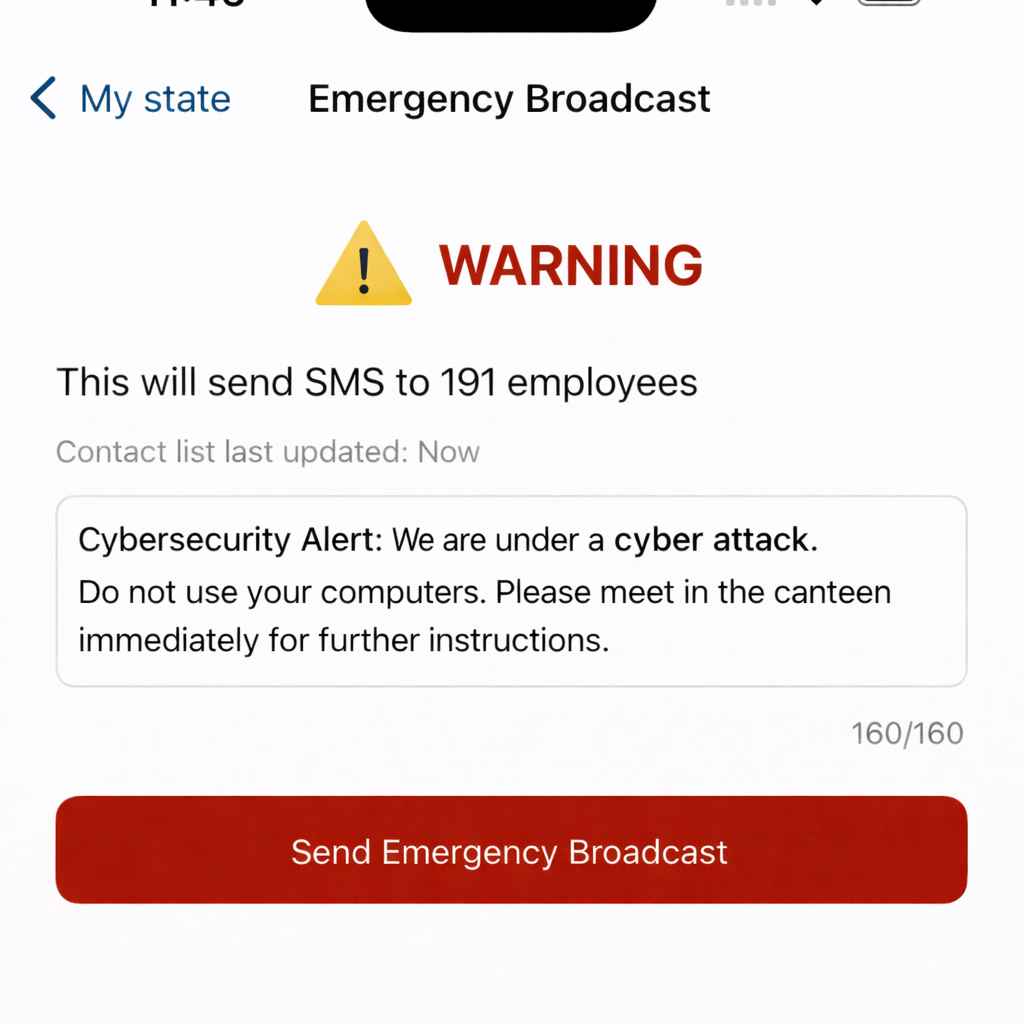
The new Emergency Broadcast feature allows authorized users to instantly send an SMS message to all internal Totalview contacts. It is designed for urgent situations where the entire organization must be notified quickly — such as system outages, security incidents, or other critical events.
Note
This feature is only available to customers hosted on Totalview Cloud.
How It Works
Authorized users access the Emergency Broadcast feature through the burger menu in the Totalview iPhone app. The screen clearly shows the number of contacts that will be reached and when the contact list was last synchronized.
Messages are sent via SMS and are limited to 160 characters to ensure clarity. To reduce the risk of messages being flagged as spam, messages are dispatched in batches of 20, which means delivery to all contacts may take some time for large organizations.
Key Features
Offline Resilience: The app caches contacts locally, so Emergency Broadcasts can still be sent even if the server is temporarily unavailable — as long as contacts were previously synchronized.
Permission-Controlled Access: The feature is not enabled by default. Administrators grant access to specific users via Smart Client Permissions in Web Admin.
Available Across Platforms: The feature is accessible from the iPhone app.
Phonebook Reborn as Contacts
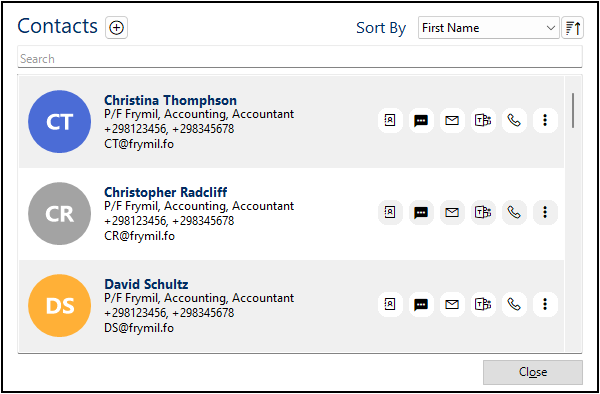
The Phonebook has been redesigned and renamed to Contacts across the Totalview platform. This is more than a cosmetic change — the underlying data model has been fully modernized.
The Contacts view is now available in Web Admin, in addition to the existing support in TotalviewAdmin and the desktop client.
What’s New in Contacts
Richer Contact Details: Contacts can hold multiple phone numbers, email addresses, and company associations.
Improved Search: Search across Name, Contact ID, Company, Department, Job Title, Chat, Phone Number, and Email from a single search bar.
Private Contacts: Contacts can be flagged as private, visible only to the user who created them.
Note
Access to Web Admin is only available to customers hosted on Totalview Cloud.
Customer Information Connector Improvements
All three Customer Information Connectors — Custom Lookup, Nrop.no, and Sona.fo — now support a configurable Time to Live (TTL) setting. This controls how long a number lookup result is cached by the server before a fresh lookup is performed.
The default TTL is 1440 minutes (24 hours), which suits most deployments. Organizations with frequently changing contact data can reduce this value to ensure results stay up to date, while those with stable data can increase it to reduce external lookup traffic.
Streamlined Authentication and Login
This release brings notable improvements to the login and authentication experience across Totalview clients.
External Login Prioritization: It is now possible to configure the server to prioritize external authentication providers, hiding the standard Totalview login form when an external identity provider is preferred. This simplifies the login experience for organizations using single sign-on.
WebView2 for Login: The HR Client, Time Client, TotalviewClient, and TotalviewAdmin have all been updated to use Microsoft WebView2 for rendering the login screen, ensuring a modern and consistent experience aligned with current web standards.
Note
This feature is only available to customers hosted on Totalview Cloud.
Totalview Connect Improvements
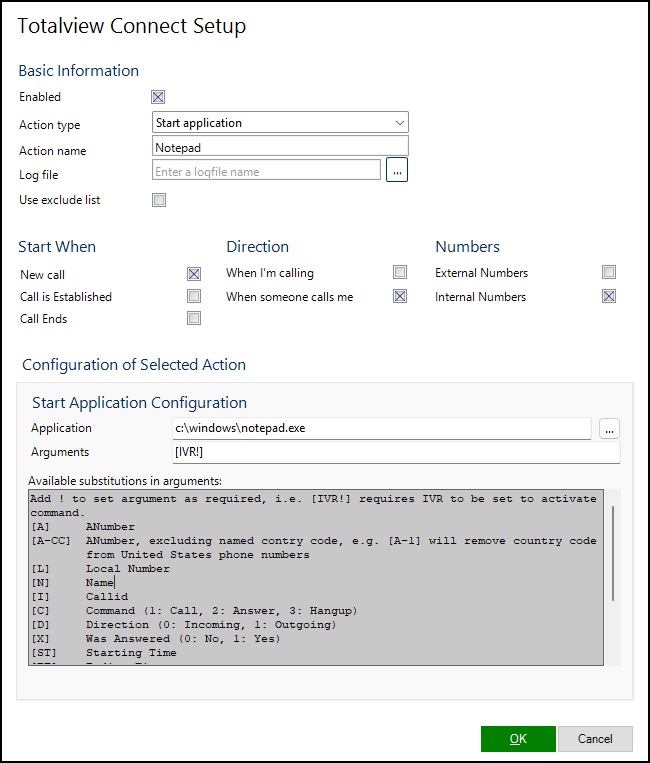
Totalview Connect has received a set of improvements in this release to make it more robust and easier to work with:
Required Parameters: Connect actions now support required parameters, making it possible to suppress an action entirely if a specific piece of call information — such as a caller name or IVR input — is not available.
Separate Execution Thread: Connect actions now execute in a dedicated thread, preventing any action from blocking the client during execution.
Environment Variables in Paths: When configuring a Start Application action, paths can now include environment variables, making configurations more portable across machines.
Cleaner Error Messages: Error output from Connect actions has been cleaned up to be more informative and actionable.
Other Exciting News
Doorway iPad
The iPad client now plays a notification sound when the user’s state changes, providing a clear audible cue on busy reception desks.
Fixed a display issue caused by Liquid Glass in iOS 26 that made parts of the UI transparent.
Time Client
The See All Requests window now includes a column showing when each item was created or last updated, making it easier to track pending requests.
Web Admin
A new “Show calls in Caller History” permission has been added per user. When enabled, new calls made and received by that user will appear in Caller History for authorized viewers. If a user does not have this permission, any calls where they are the calling or called party — as well as any call connections they are involved in — will be excluded from Caller History entirely. This gives administrators fine-grained control over which users’ call activity is visible.
A new help button has been added in the Web Client, linking directly to the Tenant Information documentation.
WebAdmin – Bug Fixes
Fixed a bug where a contact could not be deleted if a comment was attached to it.
Fixed a bug where phonebook import failed for larger files. HTTP max timeout has also been increased and specific timeout errors are now reported when importing.
Server and Infrastructure
Teams Presence access tokens are no longer partially logged, closing a potential information disclosure gap.
When the Totalview client takes more than 500 milliseconds to process a server message, this is now surfaced as an informational log entry on the server side, aiding performance troubleshooting.
3CX and IPOffice now correctly report call direction and state for outgoing calls in the call log.
Additional Bug Fixes
Fixed a bug where the referrer number was incorrectly populated for number log calls in the desktop client.
Fixed Android issues including: incorrect “+” prefix on custom forwarding numbers, forwarding options being hidden when the keyboard is open in OneConnect, and incorrect week/year text at year turnover in the Time module.
Fixed a Manager Service bug where a failure to start one service would prevent other services from starting.
Fixed a TimeExporter bug that caused errors when editing the most recently added person or balance entry.
Fixed an Exchange 365 connector issue by adding timeout and backoff handling for users who take a long time to fetch appointments.