
Totalview 2026 Release Notes
We are proud to announce that Totalview 2026 is here and share the highlights for this release.
-
See full list of changes to Totalview in the Change Log.
Introducing Caller History
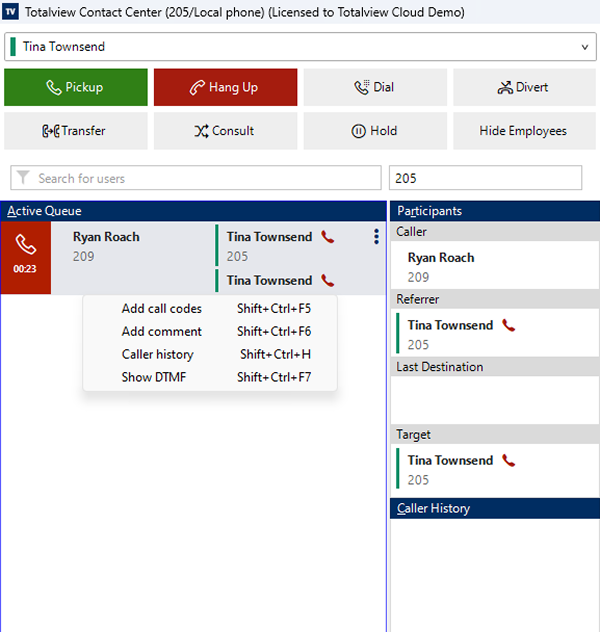
We are thrilled to introduce Caller History, the flagship feature of Totalview 2026! This powerful new capability provides instant access to complete communication history with your customers, transforming how your team handles every interaction.
Why Caller History?
In today’s fast-paced business environment, context is everything. When a customer calls, your team needs immediate access to previous conversations, notes, and interactions. Caller History delivers this critical information right at your fingertips.
Key Features
Easy Access to Call History: Open caller history with a single click when handling calls. An icon indicator shows when comments have been added to previous calls.
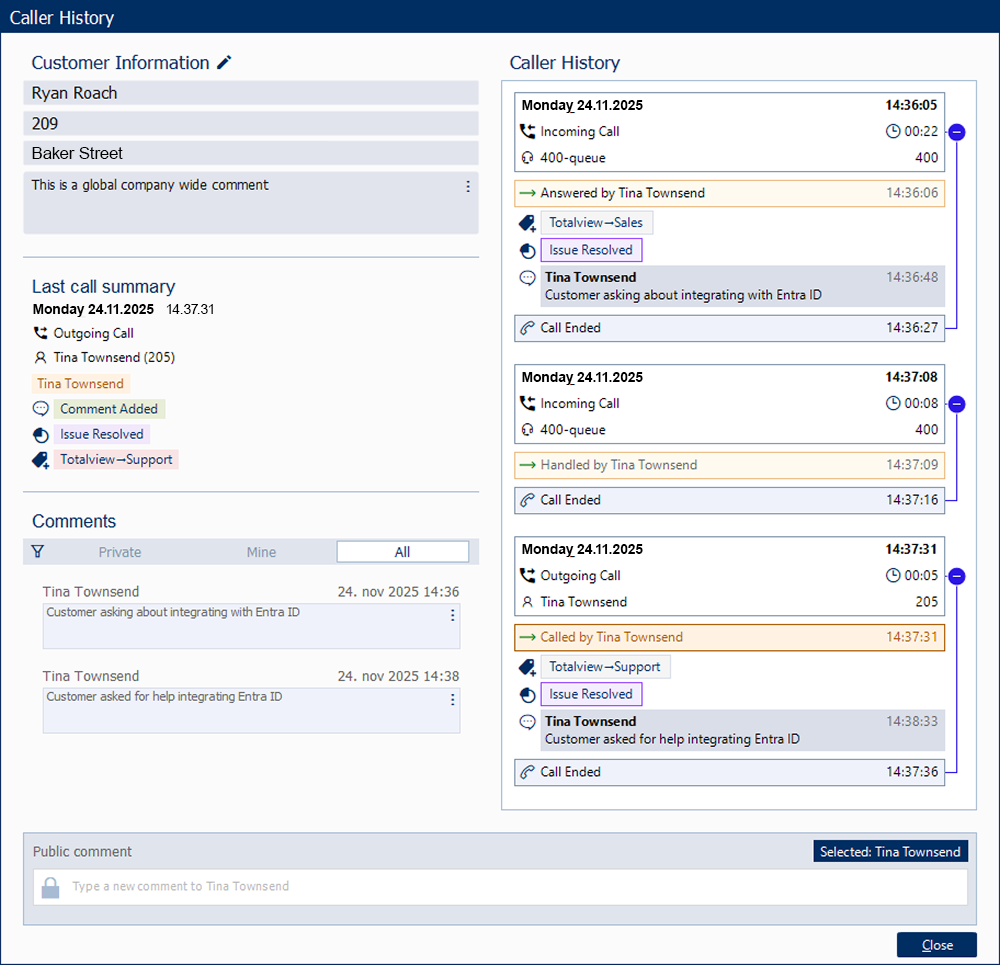
Complete Call Overview: View all previous calls with each customer in one comprehensive timeline.
Detailed Call Notes: Access notes and comments from previous conversations. Filter notes by Mine, Private, and Public to quickly find relevant information.
Call Codes Integration: See reason codes associated with previous calls, providing valuable context about past interactions.
Contact Information at a Glance: View caller details including name, phone number, and address instantly.
The Benefits
Improved Customer Service: Provide personalized service by accessing complete call history and notes with your customers.
Increased Efficiency: Eliminate time spent searching for previous interactions or asking customers to repeat information.
Better Team Collaboration: Ensure seamless handoffs between team members with shared call history and notes. Use note filtering to separate personal notes from team-shared information.
Enhanced Professionalism: Demonstrate to customers that you value their time and previous interactions.
Informed Decision Making: Review past call outcomes and reason codes to better understand customer needs and history.
This feature represents a significant advancement in how organizations manage customer relationships through the Totalview platform, ensuring every interaction is informed and effective.
Enhanced HR Client Capabilities
We’ve significantly enhanced the HR Client module with powerful new features that streamline employee management and recruitment processes.
Set Future Deactivation Dates
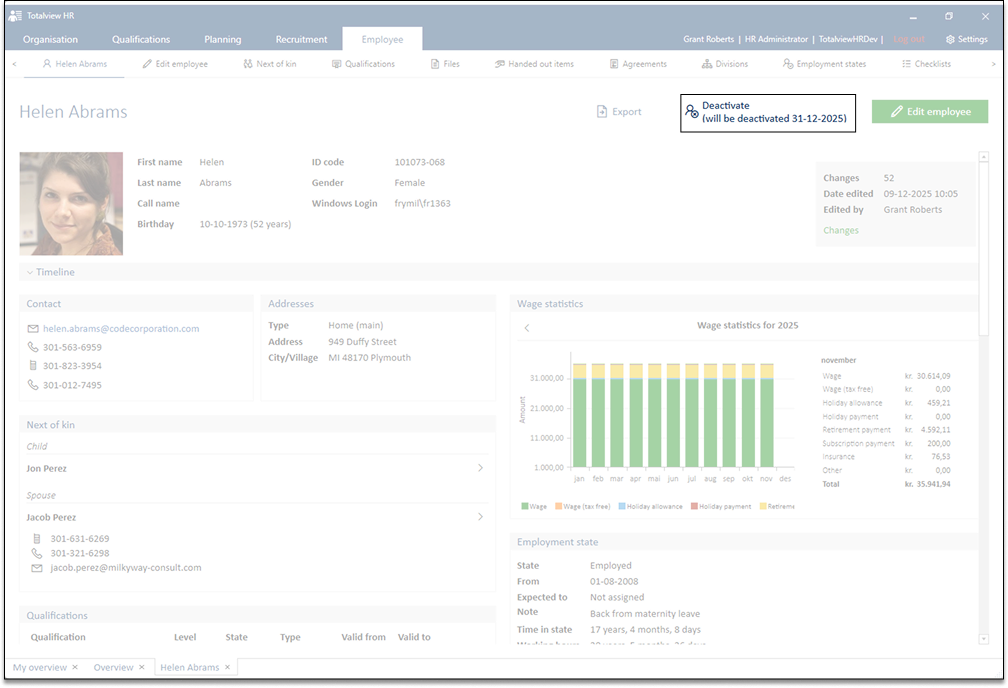
Plan ahead with the ability to set employee deactivation dates in the future. This feature allows HR teams to:
Plan Departures: Schedule employee deactivation dates in advance for planned departures or contract endings.
Maintain System Access: Ensure employees maintain appropriate access until their last day.
Automated Processing: System automatically processes deactivation when the scheduled date arrives.
Enhanced Vacancy Management
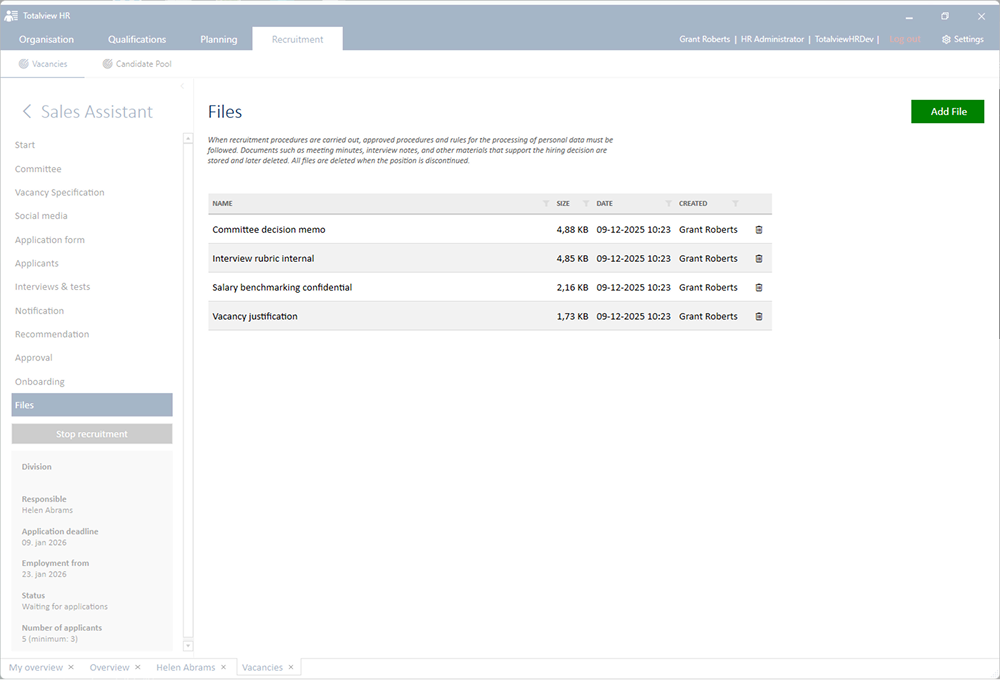
Upload files directly to vacancies to create comprehensive job postings and maintain better documentation:
Rich Documentation: Attach job descriptions, requirement specifications, and relevant documents directly to vacancies.
Centralized Information: Keep all recruitment materials in one place for easy access by hiring managers.
Better Collaboration: Share comprehensive vacancy information across your recruitment team.
Simplified Next of Kin Management
We’ve streamlined the process of adding next of kin information to employee records, making it faster and more intuitive for HR administrators.
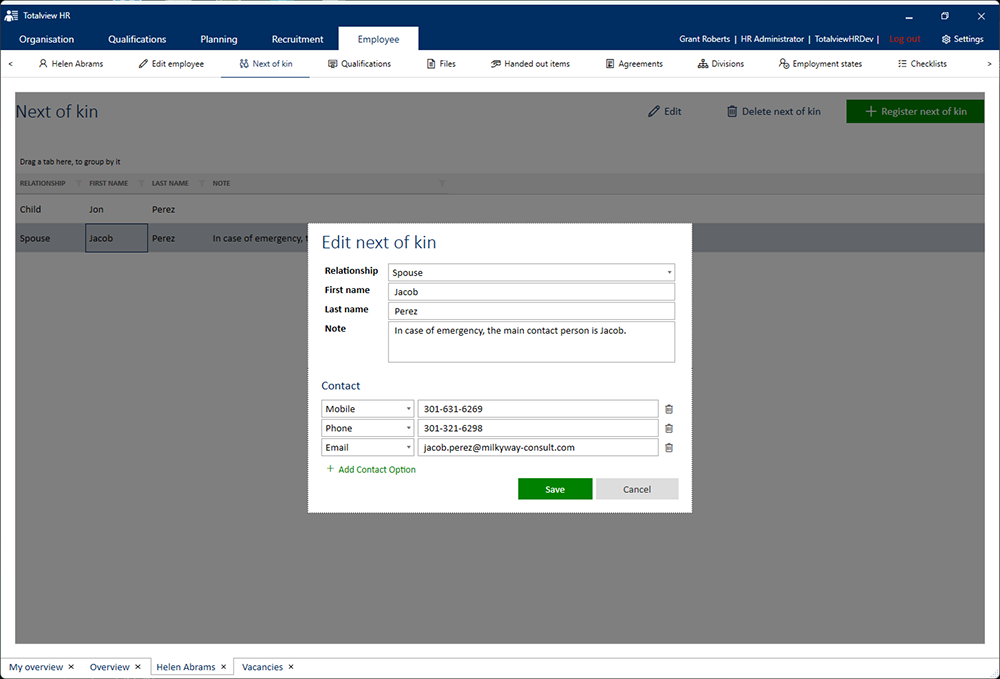
Image Compression Improvements
The HR Client now automatically compresses employee photos to JPEG format instead of storing them as uncompressed BMP files, resulting in:
Reduced Storage Requirements: Significantly smaller file sizes reduce database storage needs.
Faster Performance: Quicker image loading and better overall system performance.
Maintained Quality: Images remain high-quality while using optimal compression.
Advanced Call Monitoring Based on User State
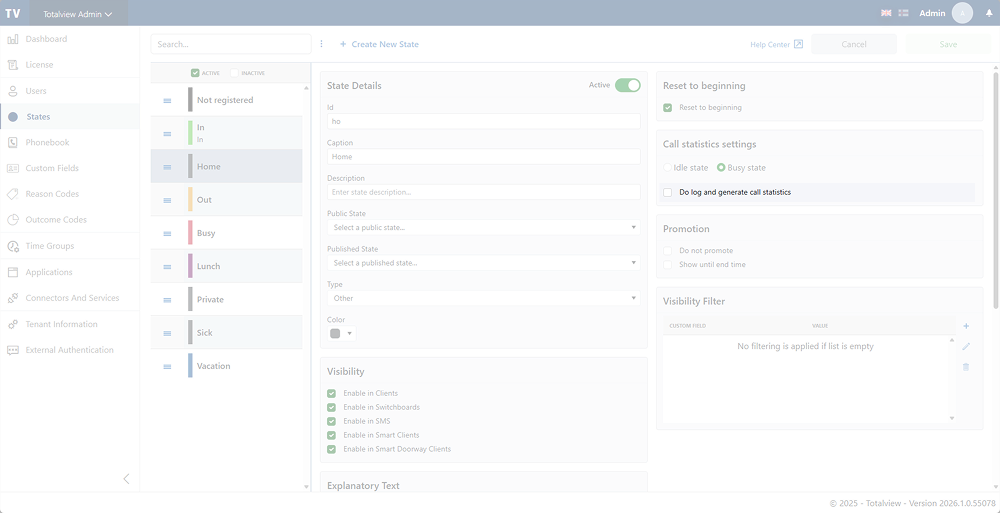
Totalview 2026 introduces intelligent call monitoring that adapts to user availability states, providing more flexible and context-aware call management.
Key Features
State-Based Monitoring: Configure call monitoring rules based on users’ current availability states (Available, Busy, Away, etc.).
Flexible Configuration: Set up different monitoring behaviors for different states in both TotalviewServer and TotalviewAdmin.
Privacy-Aware Configuration: Align call monitoring with user status and organizational policies.
Enhanced Call Center Management: Supervisors can monitor calls more effectively based on agent states.
This feature provides organizations with more granular control over when and how calls are monitored, giving you greater flexibility to balance quality assurance needs with organizational policies.
Konnekta Enhancements for Multi-Connector Environments
Totalview 2026 brings significant improvements to Konnekta integration, enabling more robust and feature-rich telephony experiences.
Support for Multiple Konnekta Connectors
Organizations with distributed locations or multiple departments can now run multiple Konnekta connectors simultaneously within a single Totalview installation. This enables different organizational units to maintain their own dedicated Konnekta connection while still being part of the same unified Totalview system.
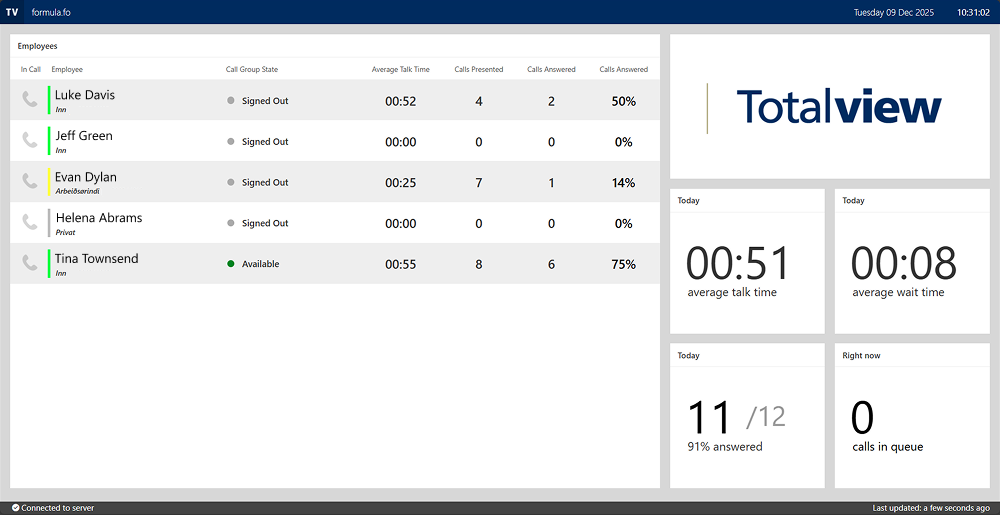
Complete Call Group Statistics
Access comprehensive call group and member statistics, providing complete visibility into:
Call Distribution: Detailed metrics on how calls are distributed across call groups.
Member Performance: Individual performance statistics for call group members.
Queue Analysis: In-depth analysis of call queue behavior and efficiency.
Camp-On Call Transfer
Konnekta now transfers calls using camp-on functionality when supported by your PBX, ensuring:
Smoother Transfers: More reliable call transfer experience.
Better Call Flow: Improved handling of busy extensions during transfers.
Enhanced User Experience: Reduced dropped calls during transfer operations.
Single Event Device Optimization
Konnekta now limits to single event device number, streamlining device management and improving system performance by reducing unnecessary event processing.
These enhancements solidify Konnekta as a powerful and reliable telephony solution for organizations of all sizes.
Time Account Management Improvements
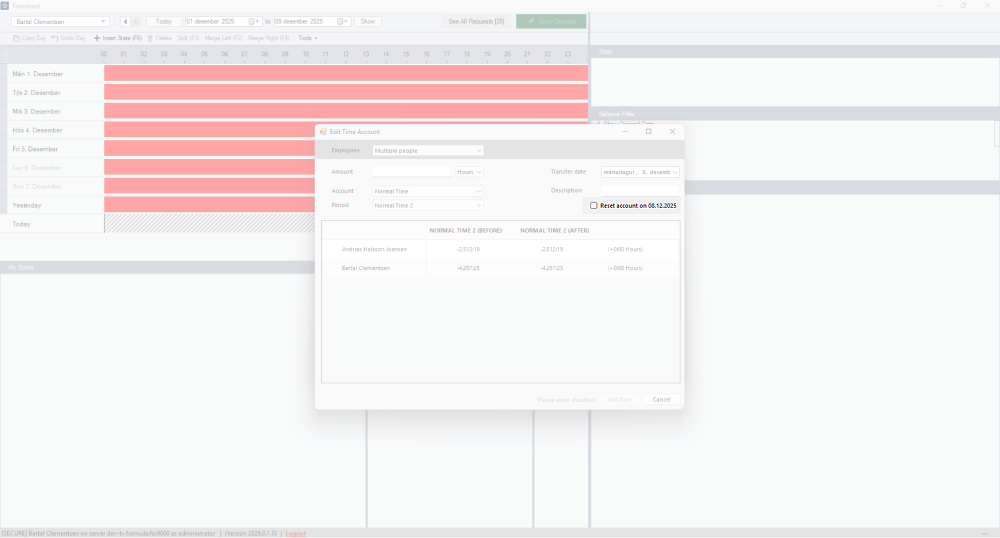
The Time Client now offers greater flexibility with the ability to reset Time Accounts to zero at a specified date.
Key Benefits
Zero Balance Reset: Reset selected time accounts for selected employees to zero at a specified date.
Simplified Balance Management: Eliminate manual calculations and entries to bring accounts to zero.
Flexible Application: Choose which employees and which time accounts to reset, giving you complete control.
This feature gives organizations better control over time account management, particularly useful when you need to standardize account balances across employees at a specific point in time.
Streamlined Administration and Security
Minimum Call Group Member Check
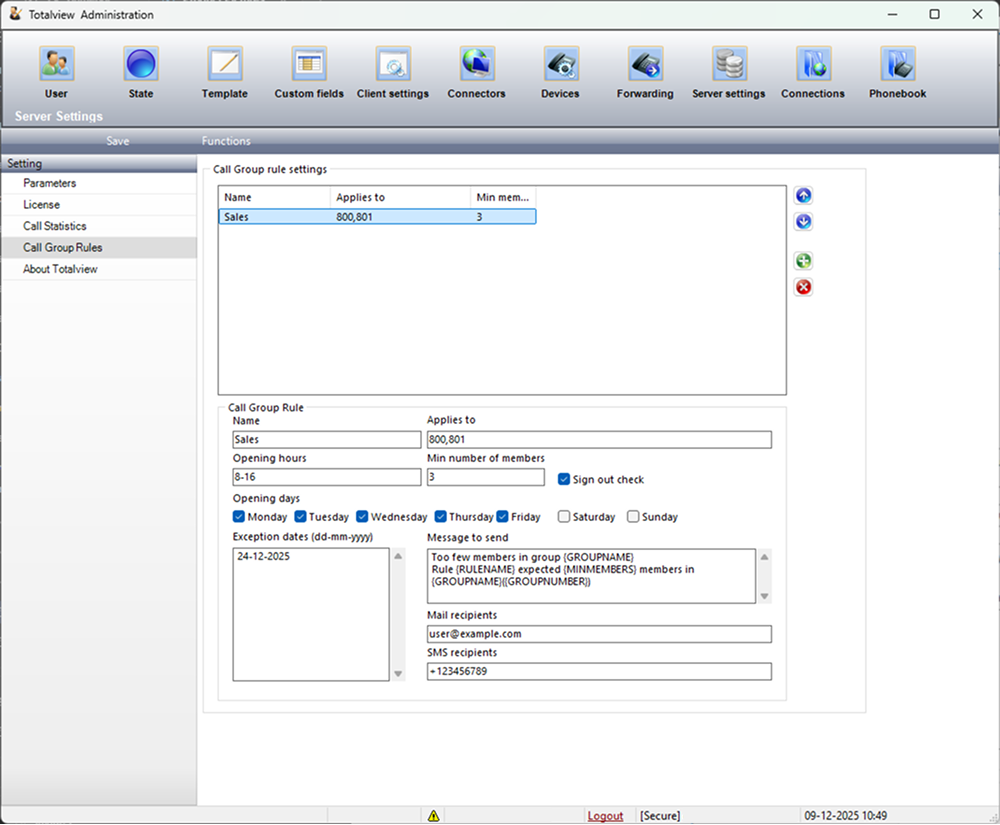
Ensure call groups always maintain adequate staffing with the new minimum call group member check feature:
Universal Support: Available for all PBX types.
Prevent Understaffing: Receive alerts when call groups fall below minimum member thresholds.
Centralized Configuration: Minimum member check settings have been moved to Server settings for easier management.
Improved Service Levels: Maintain consistent customer service by ensuring optimal agent availability.
Enhanced WebAdmin Capabilities
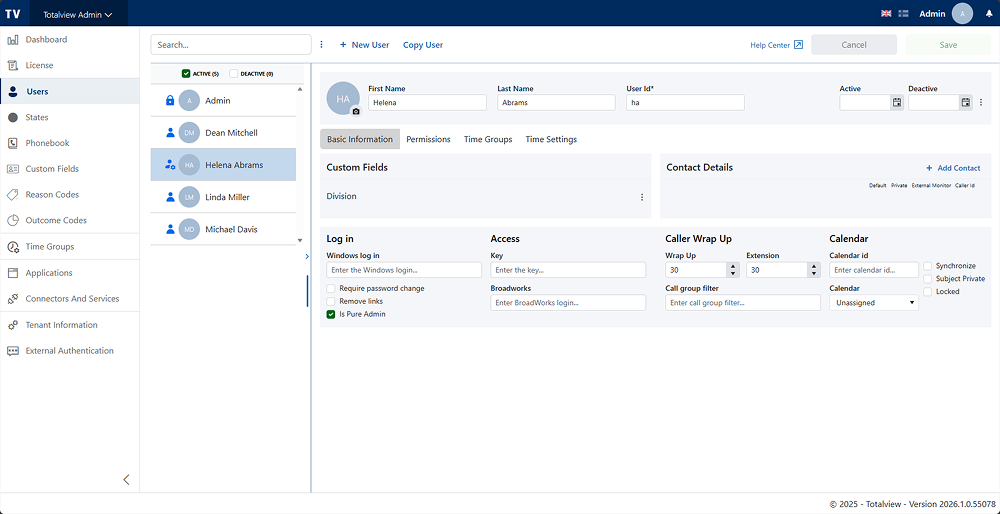
Improved User Management: Pure admin users are now included in Web Admin users overview for complete visibility.
New Telenor Denmark Mobile State API
For Telenor Denmark customers, Totalview now implements and uses the new mobile state API for improved mobile device state synchronization.
Automatic User Image Synchronization from Active Directory
Totalview 2026 introduces automatic synchronization of user profile images from Active Directory, making user management more efficient and ensuring consistent user representation across your organization.
Key Features
Automatic Image Import: User images are now automatically synchronized from Active Directory during regular sync operations.
Configurable Synchronization: Enable or disable image synchronization with a simple checkbox in the AD Connector settings.
Smart Update Detection: Images are only updated when they’ve actually changed in Active Directory, preserving cached images and improving performance.
Automatic Image Optimization: Images are automatically resized to appropriate dimensions for optimal storage and display.
Respects User Settings: Users excluded from AD resynchronization (“Disable AD Resync”) will not have their images updated automatically.
Benefits
Reduced Manual Work: Eliminates the need to manually import user images one by one.
Always Up-to-Date: User profile images stay synchronized with your Active Directory automatically.
Consistent User Experience: Ensures all users have current profile photos across Totalview clients.
Better Recognition: Helps team members quickly identify colleagues in the Switchboard and Contact Center with up-to-date photos.
How It Works
In the Admin Connectors settings for your AD connector, you’ll find a new option “Sync images from AD”. When enabled, the connector will automatically check for image updates during each synchronization cycle and import any new or changed images. The system intelligently detects whether an image has been modified in AD and only updates when necessary, ensuring efficient use of resources.
Other Exciting News
Client Improvements
SMS Receipt Pairing: Receipts for sent SMS messages are now correctly paired with the original send operation for better message tracking.
Improved State Display: Fixed display issues where long messages or locations in states/appointments were drawn outside textboxes.
Better License Management: Editing logged-in user data no longer requires re-login when license limit is reached.
Call Groups UI Fix: Call groups available slider now displays correctly without overlapping the header.
Server Enhancements
Number Interval Support: Templates and Forwarding rules now support using number intervals when defining call group sign-in/out numbers.
Provider Updates: Optimized how connected providers are updated when settings change.
Improved Template Search for Calendar Appointments: When synchronizing Outlook appointments, the server now searches for templates using both untrimmed and trimmed #name from appointment subjects, automatically removing trailing special characters for more flexible template matching.
Active Directory and Synchronization
Smart Value Selection: When users are in multiple AD Groups, wrapup time and extension now use the largest available value for optimal configuration.
Improved Error Handling: Fixed synchronization issues in AD Konnekta where sync would fail if users had no personal lines or empty DirFields.
AutoUpdater Enhancement
The AutoUpdater has been refined with:
Simplified Console UI: New, cleaner console interface for update feedback.
Removed Console Logging: Streamlined update process without verbose logging.
Teams Integration
TotalviewTeamsPresenceFirstLogin now supports more flexible server connection configurations, accommodating diverse deployment environments.
Bug Fixes and Performance Improvements
HR Sync: Fixed issue where birthday was not set correctly when importing from payroll systems.
Konnekta Call Statistics: Resolved issue where the same call could count multiple times if bounced or redistributed.
Time Server: Fixed bug preventing users from rejecting time change requests.
Mobile Web: Fixed device type issue when showing associated call groups for users with multiple device types.
WCF Optimization: Improved performance of GetUserDeviceCallLog method regarding population of resource names.
WebAdmin Phonebook Import: Fixed bug that prevented phonebook import from working when importing larger files, ensuring smooth import of extensive contact lists.