
Set Forwarding
This endpoint allows you to set a user’s forwarding device. This is useful for redirecting a user’s local device to a different device, which can help in managing their workload and ensuring that they are reachable on the correct device.
Endpoint URL
(see more)
[POST] https://[address]:[port]/rest/ExternalSetForwarding
The endpoint supports both Totalview userid and email
Calling the Endpoint
You must specify three parameters alongside a header:
- Parameters
UserID- note: this field can be set to a userid or emailToDevice- What device to forward the user’s local device to.ForwardingType- How to forward. Valid values areNone,Keep,All,External, andInternal.
- Headers
x-api-key- This is the API key from the WCF Connector in Totalview Admin (see more)
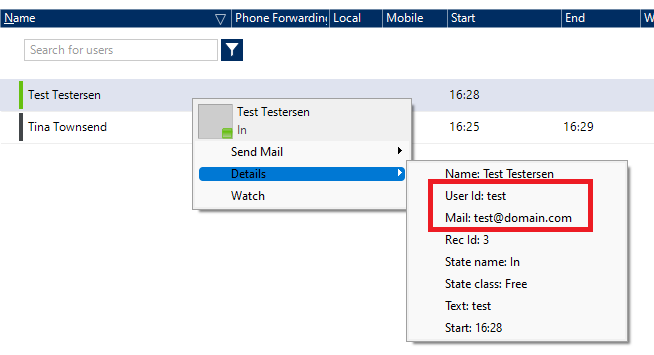
Finding the UserID / Email Address
You can find a user’s UserID and Email by right-clicking on the user in the Totalview Client
Example Calling the Endpoint via cURL
curl --location 'https://localhost:5039/rest/ExternalSetForwarding' \
--header 'x-api-key: {BF1E7B12-F085-435D-8FF7-412D88692FC4}' \
--header 'Content-Type: application/json' \
--data '{
   "userId": "test@domain.com",
   "toDevice" : "+123456789",
   "forwardingType": "All"
}'
Example of a successful call
{
   "Error": "",
   "Status": true
}
Example of a failed call
{
   "ExceptionType": "SetForwardingFailed",
   "Message": "No default local device found found for user with UserId: test@domain.com"
}