
Set Current State With Template
This endpoint allows you to set a user’s current state using a template. This is useful for quickly applying a predefined state to a user, which can help in managing their workload and ensuring that they are in the correct state for their tasks.
Endpoint URL
(see more)
[POST] https://[address]:[port]/rest/ExternalSetCurrentStateWithTemplate
The endpoint supports both Totalview user IDs and email addresses.
Calling The Endpoint
You must provide the following parameters along with the required header:
- Parameters
UserID- note: this field can be set to a userid or emailTemplateShortName- what template to use for the stateComment- (Optional) The comment to be added to the stateEndDate- (Optional) The specific end date in UTC. If null then the default duration defined in the template will be used. Format: yyyy-MM-ddTHH:mm:ssAttachment- (Optional) Specify attachments for this state in XML
- Headers
x-api-key- This is the API key from the WCF Connector in Totalview Admin (see more)
Requirements for Attachment
The root of the XML has to be of type ATTACHMENTS
ATTACHMENTS can be sent without any child elements:
<ATTACHMENTS />
If ATTACHMENTS has descendants, the first level descendants should be of type ATTACHMENT
ATTACHMENT elements have four required attributes:
CAPTIONis the attachment section caption shown in F5/F6 (in the Totalview Client).ATTACHMENTIDis a unique id for this attachment. This must be unique for each Attachment connector.PROVIDERis the name of the Attachments connector in TotalviewVERSIONis the version of the XML
All ATTACHMENT elements require at least one FIELD descendant
FIELD elements have four required attributes:
FIELDIDis a unique id for this ATTACHMENTDEFINITION.CAPTIONis the label for the field.DATAIDcorresponds to the ID of the ATTACHMENTDEFINITION in XML, SQL, or Business CentralDATAVALUEcorresponds to the VALUE of the ATTACHMENTDEFINITION in XML, SQL, or Business Central
<ATTACHMENTS>
   <ATTACHMENT CAPTION="Case" ATTACHMENTID="XMLCASE" PROVIDER="Attachment" VERSION="1.1">
      <FIELD FIELDID="CUSTOMER" CAPTION="Customer" DATAID="1000" DATAVALUE="Jackson Car Sale">
         <FIELD FIELDID="CASE" CAPTION="Case" DATAID="1001" DATAVALUE="Totalview 3 TRS">
            <FIELD FIELDID="ACTIVITY" CAPTION="Activity" DATAID="1002" DATAVALUE="Installation">
               <FIELD FIELDID="SUBACTIVITY" CAPTION="Sub activity" DATAID="1003" DATAVALUE="Server setup" />
               <FIELD FIELDID="WORKTYPE" CAPTION="Work type" DATAID="1007" DATAVALUE="On location" />
            </FIELD>
         </FIELD>
      </FIELD>
   </ATTACHMENT>
</ATTACHMENTS>
Finding The UserID / Email Address
You can find a user’s UserID and Email by right-clicking on the user in the Totalview Client
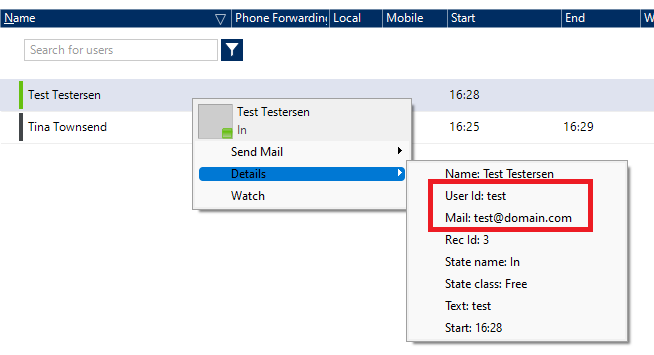
Finding The Template Short Name
Open Totalview Admin
Navigate to the Template view
Click on any of the templates
The
templateShortNameis the first field called Id
Example: Calling the Endpoint Using cURL
curl --location --request POST 'https://localhost:5039/rest/ExternalSetCurrentStateWithTemplate' \
--header 'x-api-key: {BF1E7B12-F085-435D-8FF7-412D88692FC4}' \
--header 'Content-Type: application/json' \
--data '{
   "userID": "test@domain.com",
   "templateShortName":"in"
}'
curl --location --request POST 'https://localhost:5039/rest/ExternalSetCurrentStateWithTemplate' \
--header 'x-api-key: {BF1E7B12-F085-435D-8FF7-412D88692FC4}' \
--header 'Content-Type: application/json' \
--data '{
   "userID": "test@domain.com",
   "templateShortName":"in",
   "comment":"Production Support",
   "endDate": "2025-05-02T17:00:00",
   "attachment": "<ATTACHMENTS><ATTACHMENT CAPTION=\"Case\" ATTACHMENTID=\"XMLCASE\" PROVIDER=\"Attachment\" VERSION=\"1.1\"><FIELD FIELDID=\"CUSTOMER\" CAPTION=\"Customer\" DATAID=\"1000\" DATAVALUE=\"Jackson Car Sale\"><FIELD FIELDID=\"CASE\" CAPTION=\"Case\" DATAID=\"1001\" DATAVALUE=\"Totalview 3 TRS\"><FIELD FIELDID=\"ACTIVITY\" CAPTION=\"Activity\" DATAID=\"1002\" DATAVALUE=\"Installation\"><FIELD FIELDID=\"SUBACTIVITY\" CAPTION=\"Sub activity\" DATAID=\"1003\" DATAVALUE=\"Server setup\" /><FIELD FIELDID=\"WORKTYPE\" CAPTION=\"Work type\" DATAID=\"1007\" DATAVALUE=\"On location\" /></FIELD></FIELD></FIELD></ATTACHMENT></ATTACHMENTS>"
}'
Example of a successful call
{
   "Error": "",
   "Status": true
}
Example of a failed call
{
   "ExceptionType": "InvalidParameter",
   "Message": "Template In not found"
}