Totalview Command
The Totalview command is a small commandline program intended to switch users state in Totalview.
This enables any program that can execute command lines to directly change a users state in TotalView e.g. Microsoft SQL Server.
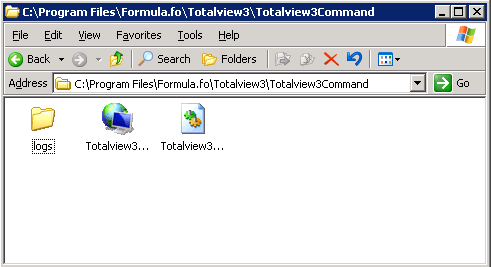
After Totalview3 is installed the Totalview3Command program is located in the folder ”…\totalview3\installFiles”. It is recommended that you in the Totalview3 folder create a new shared folder and place the Totalview3Command program in this folder. The first time Totalview3Command is executed a folder for logfiles and the helpfile Totalview3 message.dll will be created.
NB! When upgrading to a newer version of Totalview3, the new Totalview3command file will be placed in ”…\totalview3\installFiles”. It is necessary to manually replace the file in theTotalview3Comand forlder with the new file.
Note
When running in Totalview Cloud, Totalview3Command is now included with the ClientsInstaller and updated via the AutoUpdater.
The executable is now located at: “%USERPROFILE%\AppData\Local\Programs\Totalview\TotalviewCommand\Totalview3Command.exe”.
The parameters required for the Totalview3 Command are:
Server and port |
server:Port |
UserId |
Valid userId e.g. tt (Tina Townsend) |
StateId |
Valid stateId e.g. in or ho |
End time |
“dd-mm-yyyy hh.mm” or “hh.mm” or “n” (no ending) |
Forwarding |
“n” , “axxx”, “exxx” or “ixxx” where xxx is the forwarding number “a”=all, “e”= external, “i”=internal. Use “k” to keep existing forwarding. If xxx is an invalid number the current forwarding is kept. |
Text |
Short text message e.g. “At work” |
TheTotalview3command can be executed from the commandpromt:
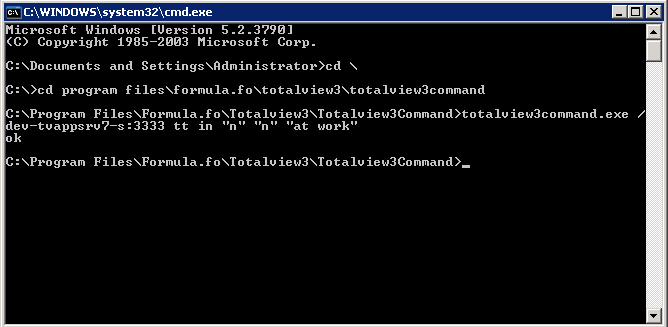
The above command contains the following parameters:
Totalview server and port |
Dev-Tvappsrv7-s:3333 |
UserId |
Tt (Tina Townsend) |
StateId |
In |
End time |
“n” (no ending) |
Forwarding |
“n” (forwarding is set to none) |
Text |
“At work” |
In this example the command is accepted and “ok” is returned. Otherwise “nok” would be returned and the state would not be changed.
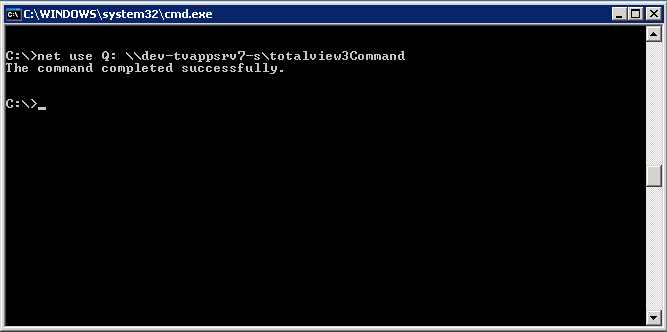
In the example above the commandprompt is run on the machine where Totalview3Command is located. If you want to run the command from the network do as follows:
Create a network drive to the machine where the Totalview server is located:
Execute the command from the network drive
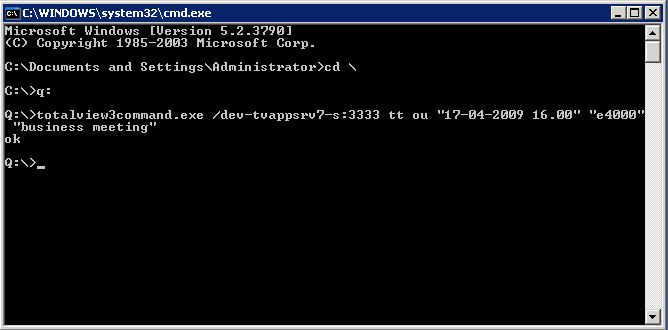
The above command contains the following parameters:Totalview server and port |
Dev-Tvappsrv7-s:3333 |
UserId |
Tt |
StateId |
Ou |
End time |
“17-04-2009 16.00” |
Forwarding |
“e4000” |
Text |
“business meeting” |
Commands executed through Totalview Command are logged in the logfile:
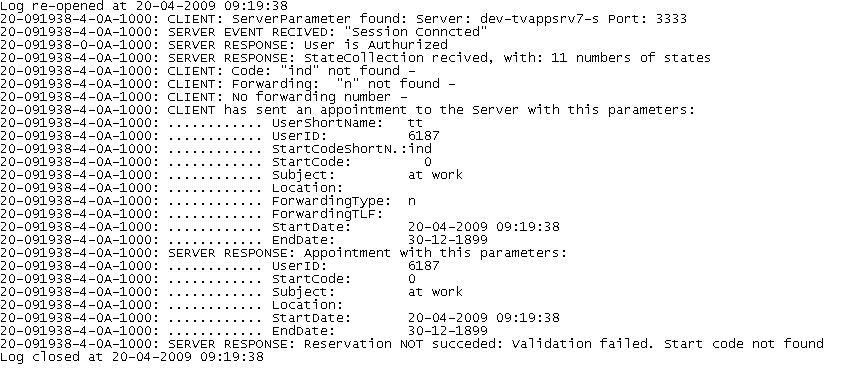
In the example above, the command did not succed because the invalid stateId “ind” was used.
Environmental variables
Environmental variables can be used in the parameters passed to Totalview3Command. E.g. the command:
totalview3command.exe
/TotalviewServer:3333 /%username% ou
“17-12-2009 16.00” “e4000” “business meeting”
will be translated to:
totalview3command.exe
/TotalviewServer:3333 /tt ou
“17-12-2009 16.00” “e4000” “business meeting”
set in a command prompt.
Service codes in Totalview3Command
Totalview3Command has been extended, so that service codes can be executed
By adding /sc:<servicecode> as a parameter to Totalview3Command <servicecode> will be executet on users default local device.
Example: Totalview3Command /localhost:3350 ct In “16:00” “k” “In” /sc:*401100
* This one changes the user’s state to In and adds agent 100 into the UCD group (*401100).
Example: Totalview3Command /localhost:3350 ct Ho “16:00” “k” “Home” /sc:#401
* This one changes the user’s state to Home and takes the agent out of the UCD group (#401).
Ignore the password using Totalview3Command
N.B. Enabling TotalviewCommand with a config setting has been deprecated
There is the option added to ignore the users password using Totalview3Command
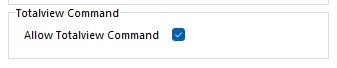
To get Totalview to ignore the password when Totalview3Command is used, the server setting “Allow Totalview Command” has to be enabled
To enable “Allow Totalview Command” go to Totalview Admin and under server settings tick: “Allow Totalview Command”