
Get Users
Endpoint URL
(see more)
[GET] https://[address]:[port]/rest/ExternalGetUsers
Calling the Endpoint
There is one optional parameter you need to specify:
- Parameters
Fields- note this field is optional, when passed it is handled as a CSV separated by ,
- Headers
x-api-key- This is the API key generated by the WCF Connector in Totalview Admin. (see more)
Finding The Custom Field Name
Open Totalview Admin
Navigate to the custom fields view
Click on any custom field
The
Custom Fieldname is the first field called Name
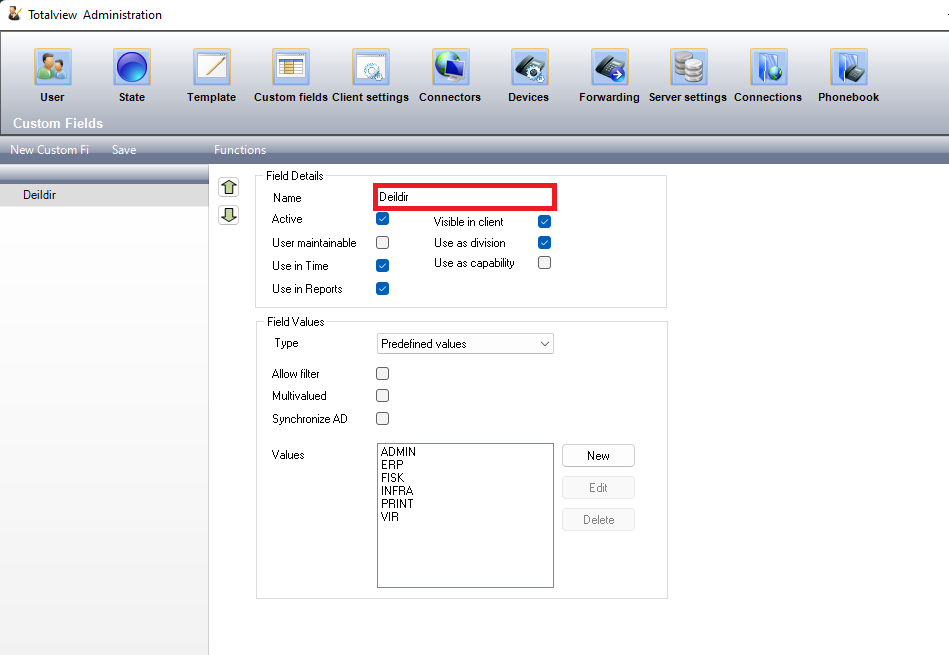
Note: Only custom fields marked as
Visible in client will be usableExample Calling the Endpoint Via cURL
curl --location --request GET 'https://[address]:[port]/rest/ExternalGetUsers?fields=Deildir' \
--header 'x-api-key: APIKEY' \
--data-raw ''
Example result
[
    {
        "CurrentState": {
            "AppointmentID": 2337,
            "Attachment": null,
            "CallCenterSettings": null,
            "ClientName": null,
            "DND": "Keep",
            "End": "2025-05-02T22:00:00",
            "EndAppointment": null,
            "EndingType": null,
            "ForwardTo": "+123456789",
            "Forwarding": "All",
            "Location": "",
            "LocationCoordinates": null,
            "OutboundCallerID": "+123456789",
            "Start": "2025-05-02T20:19:24",
            "StartState": 1,
            "State": {
                "Caption": "In",
                "ShortName": null,
                "SortOrder": 0,
                "StateColor": {
                    "B": 21,
                    "G": 255,
                    "R": 34
                },
                "StateEndingType": "NoRequired",
                "StateID": "In",
                "TextIsRequired": true
            },
            "Subject": "In",
            "UserRecID": 6203
        },
        "CustomFields": [
            {
                "Caption": "Division",
                "UseAsDivision": true,
                "Values": [
                    "ADMIN"
                ]
            }
        ],
        "FirstName": "Tina",
        "FullName": "Tina White",
        "ID": 6203,
        "LastName": "White",
        "LocalNumber": "+123456789",
        "MobileNumber": "+123456789",
        "PhoneState": "Unknown",
        "PresenceState": null,
        "UserID": "TW",
        "WorkNumber": null
    }
]