
Totalview Help Center

User Guides

  • Authentication
  • PC Client
  • Wallboard
  • iPhone
  • Android
  • Doorway Client for Windows tablet
  • Doorway Client for iPad
  • Reports
  • HR Client

Documentation

  • Admin
  • Web Admin
  • Authentication
    • How To Setup
    • How To Enable
    • Settings
    • Change Password on Next Login
    • Add Microsoft 365 Authentication
    • Remove External Authentication Links
    • Setup Reverse Proxy
  • HR
  • Time
  • Reports
  • Database
  • Public API
  • Technical Guides
  • Release Notes
Totalview Help Center
  • »
  • Authentication »
  • Remove External Authentication Links

Remove External Authentication LinksΒΆ

You can remove all external authentication links for a user.
This can be necessary if an Microsoft 365 account is bound to the wrong user.
To do this login to Totalview Admin.
Click on User and find the user that should change password on next login.
In the bottom right corner under Login set a check mark in
Click save.
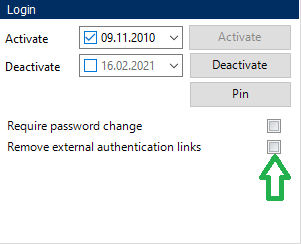
../../_images/RemoveExternalAuthenticationLinks.png
Previous Next

© Copyright 2025, Formula.

Built with Sphinx using a theme provided by Read the Docs.
Documentation v: Totalview 2025 SP2
Versions
Totalview 2025 SP2
Totalview 2025 SP1
Totalview 2025
Get in Touch
sales@total-view.com
+298 344000
www.total-view.com
Privacy Policy Statement
Read here