
Payroll system
A payroll system task allows synchronization between payroll systems and Totalview HR. At the moment this only supports the Payroll System LøttLøn.
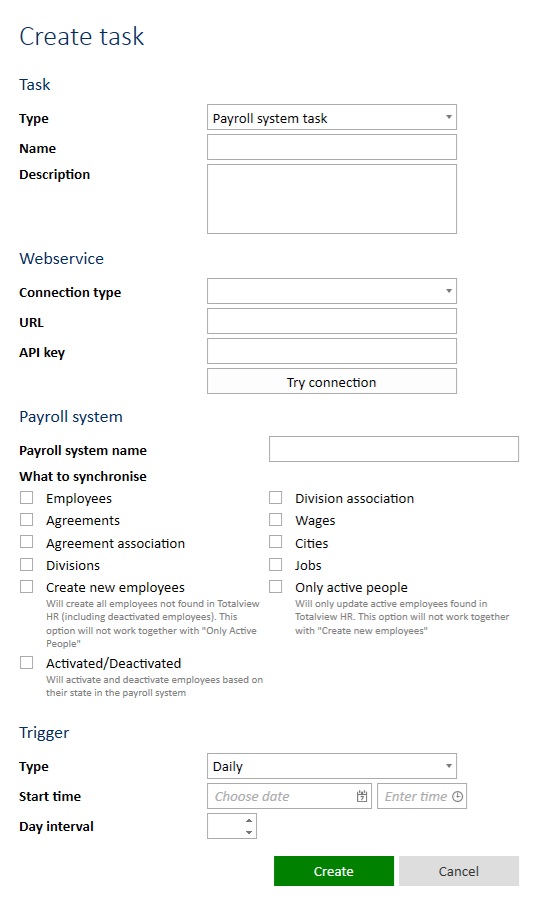
Recommended setup
The recommended setup is to create this task.
Name: LøttLøn dáta samankoyring
- What to synchronize
[x] Employees
[x] Agreements
[x] Agreement association
[ ] Divisions
[x] Create new Employees
[x] Activate/Deactivate
[ ] Division association
[ ] Wages
[x] Cities
[x] Jobs
[ ] Only active people
Trigger Daily with Start Time set to tomorrow at 01:00 and Day Interval 1
If the Division in the Payment System matches well with divisions in Totalview HR, then they can be synchronized also, but the recommended way is to manually input the CODE from the Payroll System into the Division Code in Totalview HR.
How to setup
Type
The type must be Payroll system task
Name
Can be whatever, but often based on what is synchronized. E.g., Payroll System synchronize people.
Description
Optional
Connection type
If running cloud this should be HTTPS. This must be the same type the wageconnector is set up to run.
URL
The address the wage connector API is available on without the schema. E.g., tvhrwage.somecustomer.com
API Key
The API key that is set in the wage connector exe.config file.
Try Connection
This button will try out the Webservice connection and ping the endpoint.
Payroll system name
The name of the payroll system. Almost always LøttLøn
What to synchronize
Employees
Will synchronize employees.
Will match Payroll System ID or ID code of employee in Totalview HR with the ID or ID Code (often P-Tal) in payroll system.
This will synchronize the values:
The first name (will be locked)
The last name (will be locked)
The call name (will be locked)
The ID Code (will be locked)
The gender (will be locked, based on p-tal)
The birthday (based on p-tal)
FirstWorkDay as the first Employment State,
The addresses. Will only add address if city with correct ISO and ZIP code is found. Will not add if found address with the same values. Works best if synchronized cities are checked.
The contacts. Will only add Mobile and/or Phone and will not add if found type with same value.
If a previously synchronized employee is not found in the latest payroll system synch, then the lock will be freed. Then see Activate/Deactivate for what can happen next.
Agreements
Will synchronize agreements, that can be found under settings/agreements.
This will not synch the association with the employees.
Will match Title of agreement in Totalview HR with Name in payroll system, or create new agreement in Totalview HR.
Will not overwrite if the agreement is precisely the same.
Agreement association
Will synchronize agreement association. This will only work if the Agreements also is checked because it checks the ID for the correct association.
Will not overwrite agreement associations where everything is the same.
Will only delete agreement associations that are created from the payroll system, and not found in the newest synchronization.
Will match Payroll System ID or ID code of employee in Totalview HR with the ID or ID Code in payroll system (often P-Tal) in payroll system.
Divisions
Will synchronize divisions, that can be found under settings/divisions.
This will not synch the association with the employees.
Will match Payroll ID or Code of division in Totalview HR with ID or Code in payroll system, or create new division in Totalview HR.
Will not overwrite if the agreement is precisely the same.
Will only delete divisions that are created from the payroll system, and not found in the newest synchronization.
This will synchronize the values:
The title
The code
The is active based on IsLocked from payroll system
Create new Employees
If this is set to true the task will be allowed to create employees found in the payroll system, but not in Totalview HR.
If set to false, then no employees are created. It will only try and match ID Code (P-Tal) of existing employees and synchronize values “onto” them.
Can only be set to true if SynchronizeActivePeopleOnly is false
Activate/Deactivate
If this is set to true then
Active employees in Totalview HR that were synchronized from Payroll System but are not found in latest synchronization are deactivated.
Deactive employees in Totalview HR that were synchronized from Payroll System but are now found in latest synchronization are activated.
The employee value IsDeleted is set based on the Deactivated value from the Payroll System. This will “soft” delete the employee from Totalview HR.
Division association
Will synchronize division association. This works best if the Divisions, and Jobs also are checked.
Will not overwrite division associations where everything is the same.
Will only delete division associations that are created from the payroll system, and not found in the newest synchronization.
Will match Payroll System ID or ID code of employee in Totalview HR with the ID or ID Code in payroll system (often P-Tal) in payroll system.
Wages
Will synchronize wages from payroll system. This will delete all previously synchronized wages and synchronize everything again.
Will match Payroll System ID or ID code of employee in Totalview HR with the ID or ID Code in payroll system (often P-Tal) in payroll system.
Cities
Will synchronize all cities that are used in address for employees in the payroll system.
Will give an error if synchronizing a city with a country ISO code or name that does not exist in Totalview HR.
Will not overwrite cities where everything is the same.
Jobs
Will synchronize jobs, that can be found under settings/jobs.
Will only match Payroll ID of division in Totalview HR with ID in payroll system, or create new job in Totalview HR.
Will only delete jobs that are created from the payroll system, and not found in the newest synchronization.
This will synchronize the values:
The name
Only active people
If this is set to true the task will only compare active people in Totalview HR with the employees from the payroll system, and synchronize data “onto” them.
Can only be set to true if ShouldCreateEmployees is false
Trigger Type
How often the task should run. Typically set to Day with a start time sometime at night 02:30 with a Day interval of 1