
WCF Payment
This documentation provides details on how to interact with the WCF Payment API. Ensure you have the necessary API keys and tenant information before proceeding.
Getting Started
License
In order to run WCF Payment API the Totalview license Salary and Project API is required.
Build your API call
Your API call must include the following components:
Host: The host for Payment API Requests is
https://TENANTNAME.totalview.cloud/PAYWCFAPI.Authorization header: Include the API Key in the header as
x-api-key.Request type: Use POST method to submit JSON payload data.
Locate your API key
The API key is registered in the TimeServer.exe.config file in the installation directory of the TimeServer.
<?xml version="1.0" encoding="utf-8"?>
<configuration>
    ...
    <appSettings>
        ...
        <add key="WCFPaymentApiKey" value="YOUR_API_KEY"/>
        ...
    </appSettings>
    ...
</configuration>
Note
The API key can be changed without needing to restart the TimeServer.
Test if connection can be established
Run this url in the browser (or with any GET request) and verify you get the response Hello World.
https://TENANTNAME.totalview.cloud/PAYWCFAPI/hello?msg=World
Get basic data
Note
Replace TENANTNAME and YOUR_API_KEY with your actual tenant name and API key.
Get a list of Users
To get a list of users from the API:
curl --location 'https://TENANTNAME.totalview.cloud/PAYWCFAPI/GetUsers' \
--header 'x-api-key: YOUR_API_KEY' \
--header 'Content-Type: application/json' \
--data '
'
Request
Empty
Response
Will return a list of TRSPaymentUsers.
TRSPaymentUser
RecID int- the Id of the userShortName string- The short name of the userName string- The name of the userCustomFields TRSCustomField[]- A list of customfields the user has
TRSCustomField
Caption string- The custom filed caption (e.g. Capability)Values string- The value of the custom field (e.g. Developer)
Get a list of approved users
To get a list of approved users from the API:
curl --location 'https://TENANTNAME.totalview.cloud/PAYWCFAPI/GetApprovedUsers' \
--header 'x-api-key: YOUR_API_KEY' \
--header 'Content-Type: application/json' \
--data '{
    "FromDate": "\/Date(1262304000000)\/",
    "ToDate": "\/Date(1577836800000)\/"
}
'
Request
FromDate DateTime- note: this field must be set to unix time in millisecondsToDate DateTime- note: this field must be set to unix time in milliseconds
Response
Will return a list of TRSPaymentUsers.
TRSPaymentUser
RecID int- the Id of the userShortName string- The short name of the userName string- The name of the userCustomFields TRSCustomField[]- A list of customfields the user has
TRSCustomField
Caption string- The custom filed caption (e.g. Capability)Values string- The value of the custom field (e.g. Developer)
Get a list of balances
To get a list of balances from the API:
curl --location 'https://TENANTNAME.totalview.cloud/PAYWCFAPI/GetBalances' \
--header 'x-api-key: YOUR_API_KEY' \
--header 'Content-Type: application/json' \
--data '
'
Request
Empty
Response
Will return a list of TRSPaymentBalance.
TRSPaymentBalance
RecID int- the Id of the balanceName string- The name of the balance
Get a list of all attachments fields
To get a flat list of all active attachment fields from the API:
curl --location 'https://TENANTNAME.totalview.cloud/PAYWCFAPI/GetAttachments' \
--header 'x-api-key: YOUR_API_KEY' \
--header 'Content-Type: application/json' \
--data '
'
Request
Empty
Response
Will return a list of TRSPaymentAttachments.
TRSPaymentAttachment
ID string- The Field IDName string- The Field Caption
Insert balance regulations
To insert balance regulations to the API:
curl --location 'https://TENANTNAME.totalview.cloud/PAYWCFAPI/InsertBalanceRegulations' \
--header 'x-api-key: YOUR_API_KEY' \
--header 'Content-Type: application/json' \
--data '{
    "regulations" : {
        "RegulationHeader": {
            "Comment": "",
            "ExternalId": ""
        },
        "BalanceRegulationEntries": [
            {
                "ResourceRecId": 1,
                "Duration": 1,
                "BalanceId": 1,
                "CountDate": "\/Date(1262304000000)\/",
                "Description": "Test"
            }
        ]
    }
}
'
Request
regulations BalanceRegulations
BalanceRegulations
RegulationHeader AccountRegulationHeaderBalanceRegulationEntries BalanceRegulationEntry[]
AccountRegulationHeader
Comment string- The comment for the inserted balance regulationExternalId string- The external id of the inserted balance regulation
BalanceRegulationEntry
ResourceRecId int- The Id of the User for the balance regulationDuration int- The total duration in secondsBalanceId int- The balance Id. Must be a valid id from GetBalancesCountDate DateTime- The date to insert the balance regulation. note: this field must be set to unix time in millisecondsDescription string- The description of the balance regulation
Response
Will return a InsertAccountRegulationsResult.
InsertAccountRegulationsResult
Successfull bool- True if inserted successfully else false.ErrorSQL string- If success is false then the sql error is given.ErrorMessage string- if success is false the error message is given.MasterRecId int- The master id of the inserted balance regulation.
Export of Records
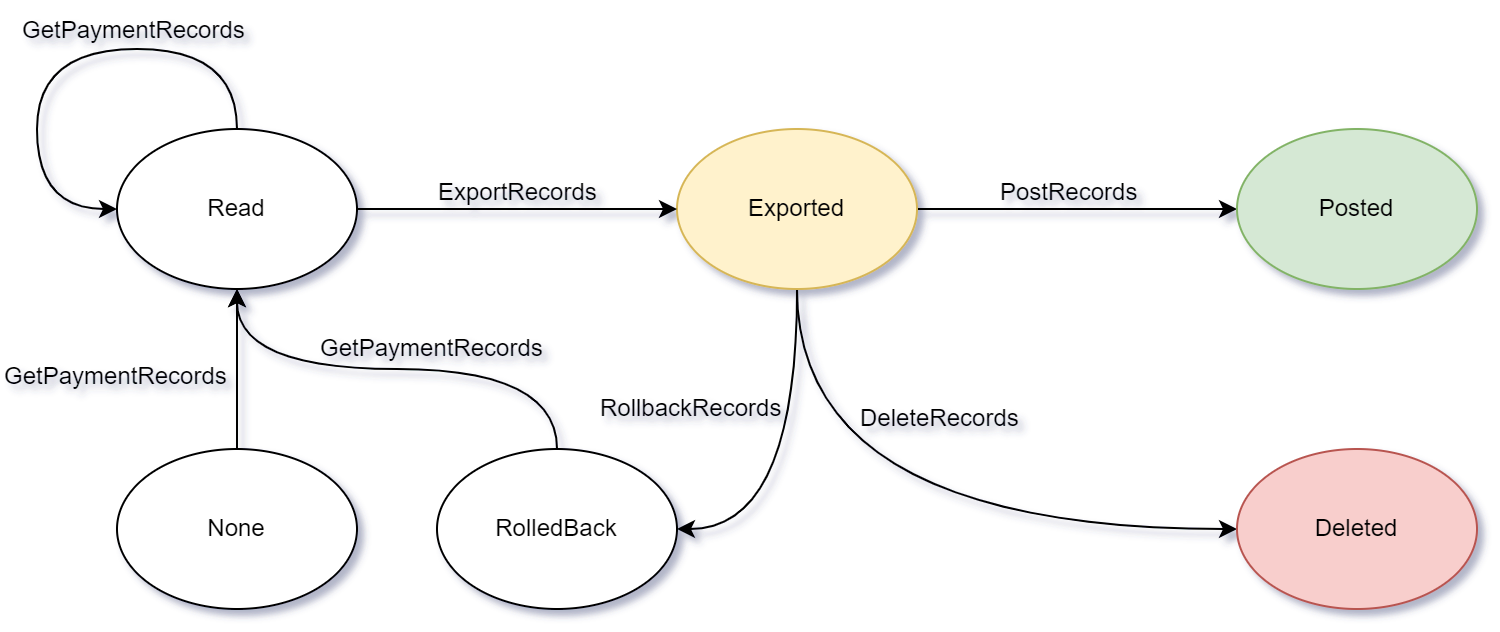
These are methods for exporting records to payment systems. These are the states payment records can be before calling methods
Note
Replace TENANTNAME and YOUR_API_KEY with your actual tenant name and API key.
Get a list of payment records
To get a list of payment records for a given list of user ids from the API:
curl --location 'https://TENANTNAME.totalview.cloud/PAYWCFAPI/GetPaymentRecords' \
--header 'x-api-key: YOUR_API_KEY' \
--header 'Content-Type: application/json' \
--data '{
    "FromDate": "\/Date(1262304000000)\/",
    "ToDate": "\/Date(1577836800000)\/",
    "UserRecIDs": [
        {
            "RecID": 115
        },
        {
            "RecID": 124
        }
    ]
}
'
Request
FromDate DateTime- note: this field must be set to unix time in millisecondsToDate DateTime- note: this field must be set to unix time in millisecondsUserRecIDs- A list of TRSPaymentRecID. If empty all users are taken.
TRSPaymentRecID
RecID int- The Id of a user
Response
Will return a list of TRSPaymentRecords.
TRSPaymentRecords
TransactionKey int- The Transaction Key that will be used for handling the transaction.UserRecords TRSPaymentUserRecord[]- List of payment records
TRSPaymentUserRecord
UserRecID int- The Id of the user.RecID int- The Id of the payment record.CountDate DateTime- The date the payment record is for.TimeStart DateTime- The datetime the record started.TimeEnd DateTime- The datetime the record ended.Duration int- The total duration in seconds.BalanceRecID int- The Id of the balance.Attachment string- The attachment in XML.Description string- The decription of the registration that resulted in this payment record.
Export records for a transaction
To export records for a transaction in the API:
curl --location 'https://TENANTNAME.totalview.cloud/PAYWCFAPI/ExportRecords' \
--header 'x-api-key: YOUR_API_KEY' \
--header 'Content-Type: application/json' \
--data '{
    "TransactionKey" : "197"
}
'
Request
TransactionKey int- The transaction key given by GetPaymentRecords
Response
Will return a boolean true or false based on if the export was successful.
Post records for a transaction
To post records for a transaction in the API:
curl --location 'https://TENANTNAME.totalview.cloud/PAYWCFAPI/PostRecords' \
--header 'x-api-key: YOUR_API_KEY' \
--header 'Content-Type: application/json' \
--data '{
    "TransactionKey" : "197"
}
'
Request
TransactionKey int- The transaction key given by GetPaymentRecords
Response
Will return a boolean true or false based on if the post was successful.
Rollback records for a transaction
To rollback records for a transaction in the API:
curl --location 'https://TENANTNAME.totalview.cloud/PAYWCFAPI/RollbackRecords' \
--header 'x-api-key: YOUR_API_KEY' \
--header 'Content-Type: application/json' \
--data '{
    "TransactionKey" : "197"
}
'
Request
TransactionKey int- The transaction key given by GetPaymentRecords
Response
Will return a boolean true or false based on if the rollback was successful.
Delete records for a transaction
To delete records for a transaction in the API:
curl --location 'https://TENANTNAME.totalview.cloud/PAYWCFAPI/DeleteRecord' \
--header 'x-api-key: YOUR_API_KEY' \
--header 'Content-Type: application/json' \
--data '{
    "PaymentRecordID" : "197"
}
'
Request
PaymentRecordID int- The payment record id to delete
Response
Will return a boolean true or false based on if the delete was successful.